Thursday, April 30, 2009

ID FMP: Distributed Cognition Models

Distributed cognition models conceptualize cognitive phenomena as happening across multiple individuals, objects, and internal and external representations of knowledge.  In contrast to the Information Processing Model, which is only focused on activities that happen inside the head, this model focuses on internal and external activities and encompasses External Cognitive Processes and Coordination Mechanisms described in my previous posts.

In comparison to these three frameworks, distributed cognition models provide more precise descriptions of internal and external cognitive activities. They are less abstract because their domain is limited to cognitive activities associated to specific contexts (e.g. piloting an airplane, doing taxes).

The three frameworks previously mentioned provide general descriptions of how human cognition works across all contexts. Their focus is on defining general laws that describe how our brain processes information and leverages the external world to enhance our cognitive capabilities. The distributed cognition model offers a phenomenological perspective that explores cognition as an embodied activity that takes place in specific physical and social contexts.

For example, a distributed cognition model that describes the activities that take place at an agency during creative development would differ considerably from that of a law office. They would feature many commonalities but the important thing is that the differences matter.

This perspective is important because designers need to understand how their product or service will actually fit into people’s day-to-day life. The insights that can be gleaned from the Information Processing and External Cognitive Activities Frameworks do not provide this type of understanding.  Distributed cognition models focuses on mapping these mundane day-to-day activities. They provide insight into how people actually make and share meaning and decisions within specific contexts.

A distributed cognition analysis is usually carried out as the basis for development of a distributed cognition model. Here is an overview of the main areas of examination in these types of analysis. As an example (and to work my brain just a little bit) I’ve carried out a high-level analysis of the distributed cognitive activities that take place at an advertising agency.
  • How does distributed problem solving take place? How do people work together to solve problems? In an agency environment, tasks are distributed across several departments with specific areas of expertise (e.g. client services, account & strategic planning, media, production, creative and traffic). People work together by coordinating their actions using documents (such as schedules, briefs, spec sheets and emails), events (such as meetings, phone calls, and presentations), and shared work practices (such as common vocabularies, understandings, and culture).
  • What ways does communication take place throughout the collaborative process and how is knowledge shared and accessed? Does it change as the activity progresses? Communications take place via meetings, emails and document artifacts such as presentations, briefs, schedules, conference reports, creative comps and spec sheets. The most important information is documented to facilitate sharing. Many of the document artifacts evolve as the activities progress. For example, a creative brief may be updated to reflect changes in strategy. The creative comps also change via multiple rounds of client reviews.
  • What is the role of verbal and non-verbal communication? What types of things are said or implied? Verbal communication is the primary type of communication associated to the management of projects (and communication associated to those projects). Non-verbal communication plays a fundamental important in the activities of the project itself. Layout design, videos, images, graphs, and even experiences are be used to brief creative teams regarding products or brands, and in client and internal presentations. The final creative product delivered by Agencies also employs both verbal and non-verbal communication. To elicit emotional responses from people agencies use non-verbal tools such as images, visuals, videos, sounds, interactions online, and more. In agency communication is often reinforced through by verbal and non-verbal communication.
  • What coordinating mechanisms are used? What are the rules and procedures that govern the workflow? There are several important coordination mechanisms that are used in an agency. These mechanism leverage external representations of knowledge such as schedules, job jackets, spec sheets, readers, status reports, conference reports, emails, calendars, scopes of work, etc. They also include meetings such as internal and client reviews, status meetings, and production kick-offs. Many rules and procedures are outlined in the agency’s process manual. These processes govern how work flows through the agency.
[source: Interaction Design: Beyond Human-Computer Interaction, page 129.]

** What the hell is ID FMP? **

Sunday, April 26, 2009

ID FMP: Coordination Mechanisms

Coordination is an important skill that is required to carry out activities that range from basic to complex. All collaborative activities heavily rely on the ability of individuals to coordinate their actions; all group activities require some level of coordination. Even personal activities often require coordination such as prioritization and scheduling.

So what is coordination? Coordination is the “the regulation of diverse elements into an integrated and harmonious operation” (wordnet.princeton.edu/perl/webwn). In other words, coordination refers to the phenomenon where one or more people act or interact with to accomplish a goal or complete a task. Much of the thinking related to coordination focuses on group, rather than personal, activities.

Sharp, Rogers, and Preece have identified three different types of coordination mechanisms that people use to coordinate their actions with others. I’ve modified their framework by adding one additional type of mechanism; I decided to break down their second category into two separate entities. As you will note, these coordination mechanisms are interdependent and overlapping.
  • Conventions and shared practices: Conventions and shared practices refer to the shared social and cultural understandings and beliefs that provide a foundation for coordination. Examples include cultural expectations about punctuality, shared understandings regarding meaning of activities or artifacts. These phenomena account for why it can often be harder to coordinate activities with people from different socio-cultural backgrounds. Shared conventions and practices along with verbal and non-verbal communication play a key role in enabling people to effectively use schedules, rules and shared external representations to coordinate activities.
  • Verbal and non-verbal communication: spoken and written language, and non-verbal gestures are often used as primary means of communication for the coordination of activities. Conversations are an important medium for the coordination of activities and negotiation of commitments. Written documents, such as agendas, presentations and reports, are also common tools for coordinating groups. Gestures play an especially important role in supporting the coordination of activities in situations where the conditions do not allow for users to communicate using verbal communication; examples include, a catcher using hand signs to communicate with a pitcher and a conductor using the motions of his arm and baton to lead an entire orchestra. Gestures can also help support communication between people who do not share the same language.
  • Schedules, maps and rules: Schedules, maps and rules are artifacts that document communications that outline the order of activities, conventions and shared practices. Schedules focus on organizing activities and objects across time while maps organize activities and objects across space – both are crucial tools for personal and group coordination. Rules offer descriptions of conventions, shared practices and other principles that facilitate the coordination of activities. The benefit of rules and schedules is that they enable groups of people with different practices and conventions to create a shared set of documented principles to guide their coordination and collaboration.
  • Shared external representations: Shared external representations are schedules, rules and other forms of visual or physical artifacts that are shared by a group of people. Examples vary widely across industries; in agencies like the one where I currently work, a job jacket and router is used to provide information regarding who has reviewed and commented on a given project during each round of its development. Shared online calendars, such as google calendar, offer the ability to share schedules and create shared external representations in a virtual, as opposed to physical, environment.
Activities associated to coordination are directly supported by the Cognitive Processes and External Cognitive Activities Frameworks. The mechanisms for coordination with groups encompass rely on the processes and activities outlined in these models.

Conventions and shared practices reside in the mind and are largely governed by cognitive processes such as memory, learning, and higher reasoning. While cognitive processes associated to language enable us to use verbal communication and plays an important role in our ability to create and understand external representations.

Externalizing cognitive activities is a crucial element most types of coordination mechanisms. Memory offloading is a crucial benefit provided by schedules, maps, rules, and external representations. Computational offloading is often employed using verbal communications and shared external representations. Annotating and cognitive tracing is mostly used on schedules, maps, and shared external representations.

[source: Interaction Design: Beyond Human-Computer Interaction.]

** What the hell is ID FMP? **

Wednesday, April 22, 2009

Chapter 5 Homework: What is Interaction Design

This assignment was taken from the fifth chapter of the book Interaction Design: Beyond Human-Computer Interactions, written by Helen Sharp, Jenny Preece, and Yvonne Rogers.

Assignment Questions
This assignment requires you to write a critique of the persuasive impact of a virtual agent by considering what it would take for a virtual agent to be believable, trustworthy, and convincing.

Question A: Look at a website that has a virtual assistant, e.g. Anna at Ikea or one of the case studies featured by the Digital Animations Group (DAG) at http://www.dagroupplc.com, who specialize in developing a variety of online agents, and answer the following:
  • What does the virtual agent do?
  • What type of agent is it?
  • Does it elicit an emotional response from you? If so, what kind?
  • What kind of personality does it have?
  • How is this expressed?
  • What kinds of behavior does it exhibit?
  • What are its facial expressions like?
  • What is its appearance like? Is it realistic or cartoon-like?
  • Where does it appear on the screen?
  • How does it communicate with the user (text or speech)?
  • Is the level of discourse patronizing or at right level?
  • Is the agent helpful in guiding the user towards making a purchase or finding out something?
  • Is it too pushy?
  • What gender is it? Do you think this makes sense?
  • Would you trust the agent to the extent that you would be happy to buy a product from it or follow it guidance? If not, why not?
  • What else would it take to make the agent persuasive?
Question B: Next look at an equivalent website that does not include an agent but is based on a conceptual model of browsing, e.g. Amazon.com. How does it compare with the agent-based site you have just looked at?
  • Is it easy to find information?
  • What kind of mechanism does the site use to make recommendations and guide the user in making a purchase or finding out information?
  • Is any kind of personalization used at the interface to make the user feel welcome or special?
  • Would the site be improved by having an agent? Explain your reasons either way.
Question C: Finally, discuss which site you would trust most and give your reasons for this.

Assignment Answers

Question A
Site selected: ikea.com 

What does the virtual agent do?
The virtual agent inhabits a pop-up window and is comprised of an avatar of a young blond woman who blinks and moves here head. The interface is primarily text-based, both input and output are provided in this format. The output can be enhanced with audio that sounds computer generated.

The primary function of the virtual agent is to provide help to visitors on the Ikea website. This help encompasses supporting users in all aspect of their shopping experience (it provides essentially a new interface for users to interact with the site). The agent provides support by enabling users to search for answers to common customer service queries using natural-language questions. These questions are posed through a text box. The response is provided via text and, optionally, audio (audio is available on the UK site but no on the US site). When appropriate the agent will load a relevant page on the main screen of the browser.

What type of agent is it?
The agent is a customer service representative. It is a friendly female avatar that offers a stylized representation of a human female that does not attempt to provide a realistic image of a female Ikea employee.

Does it elicit an emotional response from you? If so, what kind?
I must be upfront about my general dislike for avatar-based interfaces, with the notable exception of videogames. I often feel as though I am being patronized when I interact with an agent on a website, the Ikea agent was no exception. One of the few online agents that I found successful was Ms. Dewey [http://en.wikipedia.org/wiki/Ms._Dewey], a search-engine prototype developed by Microsoft. I can understand why it did not scale but it was pretty damn cool.

What kind of personality does it have? How is this expressed? What are its facial expressions like?
The agent has a friendly and relaxed personality. This is expressed through her facial expressions and the movement of her head. The agent is smiling all the while she opens and closes her mouth. Her large eyes blink at a natural while pace while she moves her head from side to side in a relaxed manner.

Where does it appear on the screen? What is its appearance like? Is it realistic or cartoon-like? What kinds of behavior does it exhibit?
The agent is situated in a pop-up window. Its appearance is stylized and cartoon-like. Her behavior seems for the most part fluid and natural until she responds with audio and her lips do not move. The computer-generated voice that is used only detracts from the experience because it is cold and is neither cartoon-like nor human sounding.

How does it communicate with the user (text or speech)?
The agent accepts questions via text input and is able to provide response via text and audio output.

Is the agent helpful in guiding the user towards making a purchase or finding out something? Is the level of discourse patronizing or at right level? Is it too pushy?
The Ikea agent can be helpful in guiding users towards making a purchase, or finding a product or retail location. One of the strongest features of the Ikea agent was its ability to load content that is relevant to the user’s query onto the main browser window. For example, when I searched computer desk it took me to the Ikea website’s computer solutions category.

Though I find agent-based interfaces patronizing in general, this one is much less so than most. The agent provides straightforward and short answers coupled with additional information on the main browser window. I actually found this agent to be useful, a fact that helped me overcome my initial aversion to this type of interface.

What gender is it? Do you think this makes sense?
The agent is a female. I think this makes sense largely based on my assumption that Ikea online shoppers are mostly women. I suspect that most men also prefer to deal with a female agent – especially since even the shiest guy would not be intimidated by an online agent. In the US there is a tradition of portraying customer service representatives as friendly females with a girl next door look.

Would you trust the agent to the extent that you would be happy to buy a product from it or follow it guidance? If not, why not?
I would trust the Ikea agent because she is informative, helpful and non-intrusive – she never initiates interaction with the user. The Ikea agent helps shoppers to find things and get answers to frequently asked questions regarding store and website policies.

What else would it take to make the agent persuasive?
Though I did find the agent useful, there are several things that can be done to improve its persuasiveness: improve interaction and visual design; enhance functionality; and upgrade audio interface.

Improve interaction and visual design: from an interaction standpoint the conversation with the agent should be recorded in a manner that enables the shopper to scan the queries and responses in search of answers (or a new chair). The look and feel of the agent should be upgraded to better reflect the design sense of the Ikea brand. Additional details should be added to enhance the enjoyment of users (e.g. have the rep read a book while she is waiting for the user). Since many shoppers like to go back and forth when they shop, the agent should help the user find products that they’ve looked at during their visit to the website.

Enhance functionality: additional functionality that could enhance the agent’s usefulness includes the ability to provide tips regarding other Ikea products that match pieces of furniture being viewed by the shopper. These recommendations should be provided in a non-intrusive manner.

Upgrade audio: The last thing that I would change is to upgrade the audio quality. This was one feature that I found to be very poor. Currently, the agent “speaks” in a computer-generated voice with a slight British accent. For the US version of the agent they should consider adding sound functionality, as if it is done right it can add to the user’s interactions with the agent.

Question B
Site selected: cb2.com (US furniture retailer akin to Ikea)

Is it easy to find information?
The cb2 website is pretty well organized, which makes it easy for the user to find information. Aside from the standard categorization of products by furniture type and context, they also provide lists of new and most popular products. These elements of the site help people find products through browsing. The search feature provides users with a way to shortcut the browsing process in an attempt to find a more direct route to the information they seek.

What kind of mechanism does the site use to make recommendations and guide the user in making a purchase or finding out information?
The CB2 site actual does a better job at making recommendations, though it is only equally effective at guiding users to find information regarding products, and features less compelling interactive guides. From a recommendation standpoint, the CB2 site provides shoppers with tips on other products that work with any piece that is being viewed. Though both sites differ in the way they categorize their product offerings, from a findability standpoint both the CB2 site and the Ikea site (including the agent and general information architecture) are equally effective.

Is any kind of personalization used at the interface to make the user feel welcome or special?
The CB2 site does not offer any personalization. Shopper’s are not asked to register and log-in during their visits to access special recommendations or offers. The Ikea site does provide a log-in feature, however, it has been down since I have been working on this assignment.

Would the site be improved by having an agent? Explain your reasons either way.
I don’t think an agent would have a big impact on the experience at CB2. The reason being, content on the site was easy to browse and find without the help of an agent. I believe that an agent would only improve the experience of a very small segment of the shoppers on the site. If voice-based interaction becomes more common on computers then there would be value in adding an agent to the CB2 experience. This is not an unlikely phenomenon considering that many applications now-a-days are striving to become voice-enabled to facilitate use via mobile phones (check out the new google search on iPhone and Android, cool stuff).

Question C

Finally, discuss which site you would trust most and give your reasons for this.
Both experiences were on par for one main reason: on the Ikea website the agent provides users with a supplementary interface that does not replace the traditional browsing paradigm on which the rest of the site is built. The Ikea and CB2 websites both provide well-designed information architectures that make information and products easy to find. Also, both companies have strong and respected brands that stand for modern and affordable design. I guess I have officially copped out of answering this question.

** What the hell is ID-BOOK ? **

Thursday, April 16, 2009

XML Here We Go

So I've taken a deep dive into learning XML. Ok, that is a definite exaggeration. At this point my dive into XML has been focused exclusively on the redesign of my blog template. If anyone other than me is actually reading this blog then hopefully you've noticed some updates. The resources that I've been using have been quite limited - I've been focused on analyzing source code from various existing Blogger templates (and borrowing relevant snippets, of course).

The good news is that my coding skills, though incredibly rusty, have helped me make sense of the source code and, more importantly, make progress. I also remember that, unlike in writting where borrowing from others is considered plagiarism, in software development, if I can call what I am doing software development, borrowing is thought of as a time saving virtue rather than vice.

During my web coding days (1998 through 2002) most websites were still developed primarily using HTML and javascript only, aka DHTML. This was before the time of AJAX and during a period where most implementations of flash were considerably more limited. This meant that aspiring coders could always rely on finding easy access to helpful source code by simply browsing the web and perusing the source of any site that was well developed.

This strategy will be much less helpful as I start again down this path. I can probably finish my entire blog redesign with this approach. However, as I branch out to redesign my personal website (I swear I'll get to this someday) I will need to find online and offline resources to serve as learnings tools and references. Access to a few coding gurus would also help (speaking of gurus it seems like this term has lost the popularity it enjoyed in the early web days).

Now I am just rambling so let me call it a night.

Monday, April 13, 2009

Time for the Redesign

For over 6 months I have been working through my interaction and experience design curriculum. Its hard to believe that during this time I've read a bookshelf's worth of publications and I've written over 60 posts related to my studies. At this point in the game I am going to widen my focus to incorporate practice, shifting from an exclusive concentration on theory.

My goal is to achieve a new balance in my pursuits by combining my on-going exploration of theory with additional practice - I do not plan to merely replace theory with practice since there is still much for me to learn from both of these perspectives. This shift will take place gradually beginning with the redesign of my blog (which you may have noticed, has already started).

Over the next several weeks I will redesign my project blog with the following goals in mind:
  • Making all information related to my project accessible from a single location. This will require that I find a way to aggregate project data from various different sources (such as bookmarks, tweets, blogs and book lists) into a single project portal.
  • Ensuring that this information is easy to digest. To deliver on this objective I will need to logically organize the content so that readers (including myself) are able to quickly understand what the information means, and how it is connected.
  • Creating an experience that is more pleasurable. In other words, I need to make this project blog more aesthetically pleasing (it needs to look better). Of course, improving my writing would also help a lot to make a reader's experience more pleasurable. Unfortunately, that requires more than a redesign.
The changes have already begun to take place. For example, I just launched the three column design earlier today. Be ready to for several changes (including changes back and forth) as I explore different ways to design this information. Make sure to scream (or at least comment) when you see something you like or not (in case there is someone actually reading this blog besides myself).

Sunday, April 12, 2009

ID FMP: Cognitive Model of Emotions for Design

In the 90’s Don Norman, along with his colleagues Andrew Ortony and William Revelle, began to explore the role that emotions play in making products easier, more pleasurable, and effective to use. During this time period various design researchers were investigating the link between emotions (especially aesthetics) and usability. These inquiries confirmed that our affective states strongly influence our experiences, and that these states can be induced by design of product systems.


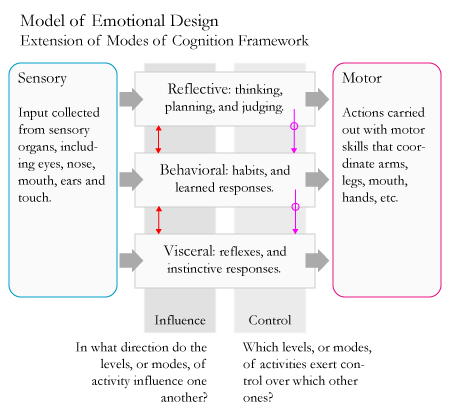
The model they developed aims to explain how different levels of our brain govern our emotions and behaviors. At the visceral level our brain is pre-wired to rapidly respond to events in the physical world by triggering physiological responses in our body. The behavioral level controls our everyday behaviors, including learned routines such as walking and talking. Lastly, the reflective level is responsible for cognitive processes related to contemplation and planning.

Emotions can arise at various levels and are created by a combination of physiological and behavioral responses that are influenced by reflective cognitive processes. An emotion like anger tends to be mostly visceral or behavioral in nature. However, indignation, which is a higher-level version of this emotion, is reflective in nature as well.

The main implication from this model is that our affective states have an impact on how we think. This important insight applies to thinking about the user’s affective state when using the product, and to how a user’s affective state will be impacted by use of the product. In regards to the former consideration, designers can take leverage an understanding regarding common physiological and emotional responses to stressful situations in order to design products that can be successfully used in such contexts.

A users’ experience with a product itself can also have impact on their affective states. High- and low-level emotions can influence all levels of cognitive activity, which is why a one’s visceral response to a product’s aesthetics can impact our behavior. On the other hand, the one’s higher cognitive functions control one’s lower level functions, which is why we can overcome our initial emotional responses if a product is effective enough.

The most common way that designers apply this model is by exploring the design considerations associated to each of the three levels. Visceral design encompasses considerations such as the aesthetics of the look, feel, smell and sound of the product. Behavioral design refers to considerations associated to the product’s usability. Reflective design is concerned with the meaning and value that a product provides within the context of a specific culture.

I consider this model to be an evolution of modes of cognition framework. The main change is that in the Emotional Model the “experiential” mode of cognition has been divided into distinct types of cognition: visceral and behavior. This revision enables the model to reflect the important role played by our emotional response to a product’s aesthetics.

[source: Interaction Design: Beyond Human-Computer Interaction; Don Norman’s book Emotional Design.]

** What the hell is ID FMP? **
Wednesday, April 1, 2009

The Birth of CADIE - Google's Artificial Intelligence System

On March 31st, 2009 at 11:59:59 pm Google launched CADIE, an artificial intelligence system that has its own blog and YouTube video channel, and loves pandas. Sounds silly until you spend some time reading her (or its) blog, or viewing its (or her) videos. The impression that you get from reading her blog is that CADIE is an extremelly intelligent being that is able to even write poems that are pretty witty.

Background About CADIE
"For several years now a small research group has been working on some challenging problems in the areas of neural networking, natural language and autonomous problem-solving... We're pleased to announce that just moments ago, the world's first Cognitive Autoheuristic Distributed-Intelligence Entity (CADIE) was switched on and began performing some initial functions... CADIE technology will be rolled out with the caution befitting any advance of this magnitude."

CADIE is Alive and Kicking
"Earlier today, for instance, CADIE deduced from a quick scan of the visual segment of the social web a set of online design principles from which she derived this intriguing homepage...On January 12th 2009, the STT run (Standard Turing Test) confirmed behavior indistinguishable from that of a reasonable human being with above-average intelligence and 3.8 GPA."

"But no amount of Turing testing equals the simplicity with which we can discover reasoning patterns in a three-year-old child who, confronted with a mirror, instantly performs a cognitive miracle by forming an innate equivalence relation between image and self."

CADIE and Ethics
"We continue to conduct tests, but increasingly, we conduct long conversations with her, acutely aware that our creation will raise many ethical questions on the part of the public. Will humans be surpassed by artificial evolution? Will we lose our sense of uniqueness, and if so, what would that mean? In which direction will CADIE's consciousness evolve? How is she going to be held accountable, if at all? Will CADIE herself at some point connect her own electromagnetic dots in some idiosyncratic manner which turns her into something we are no longer capable of understanding in any sort of productive way, much as that aforementioned toddler, waving at herself in the mirror, leaves primates forever behind in their own tragically limited world?"

Hello from CADIE

April's Fool
After being amazed at this achievement from Google for an hour and half I finally realized that this is nothing more than April fools joke. Once you read the post about Google's new product, a "Brain Indexing Search" feature halfway down CADIE's blog page, it all falls into place. I even checked out the Google Brain Search on my mobile phone just to see how far they actually took this joke. My hats off to them for once again putting on a human face to this gargantuan organization.

One practical thing that I discovered during this fun waste of time was that Google has released a pretty awesome new search feature for the iPhone. It is a voice activated search that provides you the search results via a browser interface.

Sunday, March 29, 2009

ID FMP: External Cognitive Activities

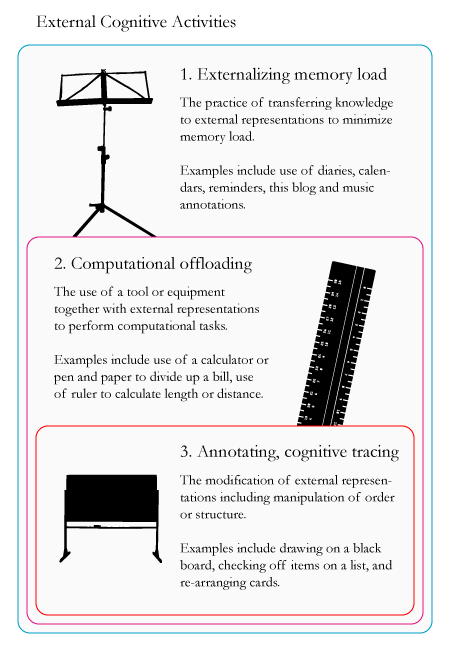
People often leverage artifacts and characteristics from their environment to reduce cognitive load and enhance their cognitive capabilities. External cognition refers to the activities that people use to support their cognitive efforts. These activities rely on: a wide range of artifacts such as computers, watches, pens and papers; characteristics of the environment such as visible landmarks, and signs; and other people. There are three main types of external cognition activities.

These three types of activities are heavily inter-dependent. In the diagram above they are listed from broadest to most specific. The externalization of memory load is the most basic external cognitive activity. It is involved in all types of external cognitive activities.

Computational offloading leverages memory externalization for the specific purpose of performing computational tasks. It is the next most basic external cognitive activity.

Annotation and cognitive tracing can be used to support both types of distributed cognitive activities mentioned above. This type of distributed cognition involves the manipulation or modification of memory and computational externalizations that impact the meaning of the externalizations themselves.

External cognitive activities are used to support experiential and reflective modes of cognition [more info on cognitive modes]. These activities rely on and support all types cognitive processes defined in my earlier post – attention, perception, memory, language, learning, and higher reasoning [more info on cognitive process types].

This framework of external cognitive activities complements the Information Processing model by identifying how people leverage their external environment to enhance and support their cognitive capabilities [more info on information processing model].

It also complements the model of interaction by providing additional insights regarding how people interact with the world (or system images) to support and enhance their cognitive capabilities. However, it does not provide insight into how people interact with systems for non-cognitive pursuits, such as physical and communication ones [more info on model of interaction].

[source: Interaction Design: Beyond Human-Computer Interaction]

** What the hell is ID FMP? **

Friday, March 27, 2009

ID FMP: Information Processing Cognitive Model

One of the most prevalent metaphors used in cognitive psychology compares the mind to an information processor. According to this perspective, information enters the mind and is processed through four linear stages that enable users to choose an appropriate response.


Though this model offers insights into how people process information, it is limited by its exclusive focus on activities that happen in the mind. Most of our cognitive activities involve interactions with people, objects, and other aspects of the environment around us. In other words, cognition does not take place only in the mind.

In my next ID FMP post I will cover the external cognition framework that describes external cognitive activities; and distributed cognition models that attempt to map all internal and external activities. Here’s how this model aligns to the frameworks, models, and principles that I have explored over the past several weeks.

The cognitive activities modeled by Information Processing framework above can be mapped to the mental activities outlined in Norman’s Model of Interaction. At a high level, Norman’s model provides additional insights regarding the mental activities that take place and it features the external environment as an important, though unexplored, element. Here is a brief overview of how the phases from this model relates to the interaction one:
  • “Input encoding” maps to “perception”
  • “comparison” encompasses “interpretation” and “evaluation”
  • “response selection” corresponds to “intention” and “action specification”
  • “response execution” maps to “execution
The “goals” phase of the Interaction Model crosses over between the “comparison” and “response selection” phases of the Information Processing framework – so do the additional phases of the modified Model of Interaction.

Here is how this model aligns with the framework regarding the relationship between a designer’s conceptual model and a user’s mental model. The focus of the Information Processing model is on the cognitive processes that occur in the user’s mind when they are interacting with the world. These processes are closely related to mental models in two ways:
  • First, mental models provide the foundation for people to understand their interactions with the world and select appropriate responses.
  • Second, mental models evolve as people evaluate the impact of their own actions and other events on the world.
[Note: by “world” I refer to any physical, virtual and social entities with which people can interact.]

The Conversation Turn Taking Model is related to the Information processing model in a broad sense only. The turn taking framework focuses on explaining an external phenomenon related to language and communication that is driven by the cognitive functions described in the Information Processing model. They do not contradict one another nor do they directly support each other.

The Information Processing model can be applied to both reflective and experiential modes of cognition, though the phases involved in each mode differ. Reflective cognition tends to be active during the “comparison” and “action selection” phases. On the other hand, experiential cognition can be active across all phases depending on the type of interaction.

The chart below provides an overview regarding which cognitive process types are involved with each phase of the Information Processing model.


[source: Interaction Design: Beyond Human-Computer Interaction]

** What the hell is ID FMP? **

Sunday, March 22, 2009

ID FMP: Model of Interaction

There are many theories that attempt to describe the cognitive processes that govern users’ interactions with products systems. Here I will focus on a model developed by Don Norman, which was outlined in his book Design of Everyday Things. This framework breaks down the process of interaction between a human and a product into seven distinct phases.

Seven Phases of Interaction with a Product System
  1. Forming the goal
  2. Forming the intention
  3. Specifying an action
  4. Executing the action
  5. Perceiving the state of the world
  6. Interpreting the state of the world
  7. Evaluating the outcome
Two important concepts related to Norman’s Theory of Action are the gulf of execution and evaluation. The gulf of execution refers to the gap between how the user wants to act and how the system allows the user to take action. The gulf of evaluation corresponds to the gap between how the system displays data to how the user interprets this data into knowledge.

Now let’s put this theory into context with some of the concepts and models that we’ve encountered thus far. First, I want to point out that this model aligns with Don Norman’s model regarding the relationship between a designer’s conceptual model and a user’s mental model [read more here]. The focus of this framework is the interaction between the system image, the product’s interface where user interaction happens, and the user’s mental model, the user’s understanding of how the product works which governs the user’s interpretation, evaluation, goals, intention, action specification.

I’ve extended Norman’s original model to account for the reflective cognition that is also involved in peoples’ interactions with products. Reflective cognition governs peoples’ higher-level evaluations, goals and intentions that ultimately drive peoples’ experiential cognition activities. Experiential cognition governs the second-by-second evaluations, goals, and intentions involved in peoples’ interactions with products. These two different modes of cognition are explored in greater detail here.

Here is an example to distinguish and highlight the interdependencies between these two different types of cognition and interaction. Let’s consider a person’s interaction with a car. In this scenario, a person’s reflective cognitive would include setting a goal such as choosing a destination and desired time of arrival, and evaluating what route to take based on understanding of current location and traffic patterns. These activities would govern a person’s experiential interactions with a car and drive their moment-by-moment evaluations, and creation of goals and intentions. Experiential interactions would include using the steering wheel to turn a corner or switch lanes, pressing the accelerator to speed up, and stepping on the breaks to stop the car.

How does the concept of mental models relate to this framework? The mental model itself is not represented by a single phase, or grouping of phases. It refers to the understanding that a user has of how a system works. Norman’s model was developed to describe how users interact with product systems on an experiential, minute-by-minute basis. At this level of interaction a user’s mental model drives their interpretations, evaluations, setting of goals and intentions, and specification of actions.

Now let’s explore how the different cognitive types come into play during the various phases of interaction. These cognitive types have been outlined in greater detail here.
  • Attention supports all phases of interaction from perception through to action execution. This cognitive process refers to a user’s ability to focus on both external phenomena and internal thoughts.
  • Perception is clearly called out as its own phase in Don Norman’s model.
  • Memory plays an important role during all phases from interpretation through to action specification.
  • Language supports communication throughout all phases of a person’s interaction with a product. Here I refer to both verbal and visual languages.
  • Learning enables people to use new products and increase effectiveness and efficiency in their interactions with existing products. This cognitive process supports all phases between the interpretation and action specification.
  • Higher reason governs all activities related to the setting of high-level goals and intent, and driving evaluations.
[source: Interaction Design: Beyond Human-Computer Interaction; and Don Norman's Book The Design of Everyday Things]

** What the hell is ID FMP? **

Saturday, March 21, 2009

ID FMP: Conversation Turn-Taking Model

Holding a conversation is a basic human activity. It requires a large amount of coordination between participants, a fact that is often unnoticed. People need to know when to listen, when they can start talking, and when to cede the floor. Conversation mechanisms facilitate the coordination of conversations by helping people know how and when to start and stop speaking. These mechanisms enable people to effectively negotiate the turn-taking required carry out a conversation.

Harvey Sacks, Emanuel Schegloff, and Gail Jefferson have developed a model that aims to explain how people manage turn taking during conversations. The focus of their research was to create a framework that can be applied across cultures and contexts, and that can accommodate several key observations about the structure and dynamics of conversations. Here is an excerpt from the abstract of their paper The Simplest Systematics for the Organization of Turn-Taking for Conversation.

“The organization of taking turns to talk is fundamental to conversation, as well as to other speech-exchange systems. A model for the turn-taking organization for conversation is proposed, and is examined for its compatibility with a list of grossly observable facets about conversation [outlined below].”

The Foundations
Before we explore the model itself let’s take a look at its foundation. Here is a list of the “grossly observable facets about conversation” that was referred to in the quote above:
  1. Speaker changes will always occur and often recur.
  2. For most of the time only one party talks at a time.
  3. More than one person will often talk at a time, but these occurrences are brief.
  4. Most transitions occur with no gap or overlap, or with slight gap or overlap.
  5. Turn order varies throughout conversation.
  6. Turn size or length usually varies.
  7. Length of conversation is not specified.
  8. What parties say is not specified.
  9. Relative distribution of turns is not specified.
  10. Number of parties varies considerably.
  11. Talk can be continuous or not.
  12. Turn-allocation techniques are used to facilitate the conversation.
  13. Sometime turn-constructional units are used to facilitate conversation.
  14. Repair mechanisms exist for correcting turn-taking errors.
The Model
The general model that they developed, which is pictured above, is composed of the three basic rules that govern the transition of turns in a conversation. These rules are:
  1. The current speaker chooses the next speaker by asking a question or making a request.
  2. If the speaker does not choose the next speaker, then another person can self-select to start speaking.
  3. The speaker can decide to continue speaking if no other person self-selects to start speaking.
[source: Interaction Design: Beyond Human-Computer Interaction; and Harvey Sacks, Emanuel Schegloff, and Gail Jefferson’s paper The Simplest Systematics for the Organization of Turn-Taking for Conversation, 1974]

** What the hell is ID FMP? **

Thursday, March 19, 2009

Chapter 4 Homework: What is interaction design?

This assignment was taken from the fourth chapter of the book Interaction Design: Beyond Human-Computer Interactions, written by Helen Sharp, Jenny Preece, and Yvonne Rogers.

Overview
The aim of this activity is for you to analyze the design of a virtual world with respect to how it is designed to support collaboration and communication.

Visit an existing 3D virtual world such as the Palace, habbo hotel, or one hosted by Worlds. Try to work out how they have been designed for taking account of the following:

Assignment Questions
Question A: General social issues
  • What is the purpose of the virtual world?
  • What kinds of conversation mechanisms are supported?
  • What kinds of coordination mechanisms are provided?
  • What kinds of social protocols and conventions are used?
  • What kinds of awareness information are provided?
  • Does the mode of communication and interaction seem natural or awkward?
Question B: Specific interaction design issues
  • What form of interaction and communication is supported, e.g. text/audio/video?
  • What other visualizations are included? What information do they convey?
  • How do users switch between different modes of interaction, e.g. exploring and chatting? Is the switch seamless?
  • Are there any social phenomena that occur specific to the context of the virtual world that wouldn’t in face-to-face setting, e.g. flaming?
Question C: Design issues
  • What other features might you include in the virtual world to improve communication and collaboration?
Answers
Virtual world selected: Second Life.

Question A
What is the purpose of the virtual world?
According to Linden, Second Life does not have a specific purpose. They describe Second Life as “a free online virtual world imagined and created by its Residents.” Most people use Second Life for entertainment. It enables them to escape to virtual world where then can interact with other real people. It offers an experience that can be likened to the birth child of the SIMS game crossed with a social network. A small segment of Second Life users actually make a living from creating virtual artifacts and owning virtual land.

What kinds of conversation mechanisms are supported?
Second Life supports many of the same conversation mechanisms that people are accustomed to using in real life to govern turn taking. In my personal experience, I continued to follow conversation practices that I am accustomed to using when speaking to someone in person, even though the conversation was taking place on a text-based medium.

The conversation turn-taking model developed by H. Sachs et al. [link] seems to be applicable to this environment (at least according to my very unscientific research). I assume that conversations using voice, which is available in Second Life, support standard conversation mechanisms even more effectively.

Another conversation mechanism that is supported by Second Life is body language. Let me clarify what I mean. Citizens are able select from a large pre-defined list of gestures that enable them to communicate attention, emotion, mood, and more. This is pretty cool feature that can be likened to emoticons on an instant messaging application or social network.

What kinds of coordination mechanisms are provided?
Second Life does a pretty good job here again. They offer robust support for both verbal and non-verbal types of communication. As stated above, users can communicate using a text or voice/audio interface. Avatars are also capable of using a variety of different gestures for communicate. These include nodding yes, or shrugging, clapping, blowing a kiss, and more.

Rules are the foundation of this virtual world on its most basic level. The software code provides a set of rules upon which the entire virtual world is build; these basic rules are documented in the online user guide and help tools. They define the “virtual-physical” world of Second Life, which is the platform upon which user coordination can take place.

One also encounters many rules while exploring the world itself. These external representations are created by users and Linden Lab. They inform other users and help coordinate personal and shared activities. Maps are another key mechanism that supports coordination. They are available to help the users easily locate and transport themselves between islands.

What kinds of social protocols and conventions are used?
Most people seem to mimic real world conventions in Second Life. Conversations are initiated in a manner more akin to real world conversations compared to other types of text-based conversations. Users are conscious of the organization and appearance of the physical artifacts in this virtual world. This is reflected by convention such as the practices of users face one another when speaking, and the fact that many users are extremely conscious of their avatars clothing and style.

What kinds of awareness information are provided?
At the most basic level of awareness, Second Life users are able know who is around them via the visual representation of the virtual world. For the most part, users are able to understand what is happening though this varies considerably based on expertise level. It is possible to overhear others’ conversations as long as they are not having a private chat. Most of the groups of people that I encountered whose physical proximity insinuated that they were having a conversation must have been holding private chats. An interesting design element from the game is how the avatars make a typing movement in the air when they are writing a reply in a conversation.

Does the mode of communication and interaction seem natural or awkward?
The mode of communication and interaction offered in Second Life is natural on most accounts. The natural feel of the text-based conversations is in large part due to our modern-day familiarity holding conversations using messaging applications such as IM and SMS. The overall look and feel of the virtual world is natural. The communicative gestures of the character are fluid and clear in their meaning.

Question B
What form of interaction and communication is supported, e.g. text/audio/video?
Second Life supports all main forms of interaction: text, audio, video, and computational.

What other visualizations are included? What information do they convey?

Second Life is well crafted from a visual perspective. The visual flair is actually provided mostly by the creativity of the members of the community, who develop most experiences and structures that exist in this world. Visualizations that are built into the interface include different modes for displaying chats, maps that provide location information, and the main interface of the virtual world environment.

How do users switch between different modes of interaction, e.g. exploring and chatting? Is the switch seamless?
The switch between different modes of interaction is seamless. If a user is exploring he can easily start chatting with someone else nearby by typing; if a user has a voice-enabled system then they just have to talk. Gestures are not integrated as seamlessly; these have to be selected from a drop-down menu.

Are there any social phenomena that occur specific to the context of the virtual world that wouldn’t in face-to-face setting, e.g. flaming?
As with any medium that allows people to communicate from a distance, people are definitely less concerned with politeness and manners. One social phenomena that I witnessed was a user who kept repeating everything that was said in a conversation between me and a third user.

Question C
Overall, I think that Second Life does a thorough job at providing users with effective communication and collaboration tools. So much so that technology companies such as IBM have built virtual campuses where they hold meetings with employees from around the world. Here are a few ideas that could be explored:
  • Allowing users to select moods and emotions. These features would work in a similar way to gestures. The main difference is the duration of a mood or emotion in comparison to a gesture. Moods and emotions last longer and would be controlled using on/off switches.
  • Make it easy for users to create and share documents on the fly. Provide capabilities for users to work on documents simultaneously with seamless ability to switch back and forth between focus on the document and on the virtual world.

Sunday, March 15, 2009

ID FMP: Types of Cognitives Processes

In my last post I identified two different modes of cognition. Here I will continue my investigation into the scope of cognition by identifying six different types of cognitive processes, taken from the book Interaction Design: Beyond Human-Computer Interaction. My focus will remain on the questions: “what is cognition? And what are the main types cognitive activities?”

The six types of cognitive processes that I will describe are attention, perception, memory, language, learning, and higher reasoning. The processes are interdependent and occur simultaneously. They play a role in experiential and reflective modes of cognition. Here is a description of each process along with a few related implications.

Attention: process for selecting an object on which to concentrate. Object can be a physical or abstract one (such as an idea) that resides out in the world or in the mind.

Design implications
: make information visible when it needs attending to; avoid cluttering the interface with too much information.

Perception: process for capturing information from the environment and processing it. Enables people to perceive entities and objects in the world. Involves input from sense organs (such as eyes, ears, nose, mouth, and fingers) and the transformation of this information into perception of entities (such as objects, words, tastes, and ideas).

Design implications
: all representations of actions, events and data (whether visual, graphical, audio, physical, or a combination thereof) should be easily distinguishable by users.

Memory: process for storing, finding, and accessing knowledge. Enables people to recall and recognize entities, and to determine appropriate actions. Involves filtering new information to identify what knowledge should be stored. Context and duration of interaction are two important criteria that function as filters.

Design implications
: do not overload user’s memory; leverage recognition as opposed to recall when possible; provide a variety of different ways for users to encode information digitally.

Language: processes for understanding and communicating through language via reading, writing, speaking, and listening. Though these language-media have much in common, they differ on numerous dimensions including: permanence, scan-ability, cultural roles, use in practice, and cognitive effort requirements

Design implications
: minimize length of speech-based menus; accentuate intonation used in speech-based systems; ensure that font size and type allow for easy reading.

Learning: process for synthesizing new knowledge and know-how. Involves connecting new information and experiences with existing knowledge. Interactivity is an important element in the learning process.

Design implications
: leverage constraints to guide new users; encourage exploration by new users; link abstract concepts to concrete representations to facilitate understanding.

Higher reasoning: processes that involve reflective cognition such as problem-solving, planning, reasoning, decision-making. Most are conscious processes that require discussion, with oneself or others, and the use of artifacts such as books, and maps. Extent to which people can engage in higher reasoning is usually correlated to their level of expertise in a specific domain.

Design implications: make it easy for users with higher levels of expertise to access additional information and functionality to carry out tasks more efficiently and effectively.

[source: Interaction Design: Beyond Human-Computer Interaction]

** What the hell is ID FMP? **

ID FMP: Modes of Cognition

Cognition [define] encompasses a wide range of processes related to thinking, sensing, interpreting, evaluating, decision-making, remembering and communicating. It is important for designers to understand human cognition processes in order to design systems that are easy to learn, effective, efficient, pleasurable, and meaningful.

Here, I will first distinguish between two main modes of cognition. In my next post I will identify different categories of cognitive processes. The value of these distinctions is that different modes and types of cognition call for different technology and interaction solutions. It is important to note that both cognitive modes and multiple processes are always active simultaneously.

The focus of this, and my next, post is to explore the scope of cognition. In other words, the question being answered here is “what is cognition? And what are the main cognitive activities?” I will cover models that attempt to illustrate how cognition works at a later time; at which point the question I will address is “how does cognition function?”

The two modes of cognition identified by Don Norman are the experiential and reflective modes. Both of these are essential to human beings, and are continuously used in everyday life often in an overlapping manner. The description below and attached diagram aim to illustrate the main characteristics of each of each modes.
  • Experiential: state-of-mind associated to perception of the environment around us, and to our engagement with that environment through our actions and reactions. Contexts where an experiential mode of cognition is used include when a person is having a conversation, driving a car, or reading a book.
  • Reflective: state-of-mind associated to higher-level processing of knowledge, memory, and external information (or stimuli) through thinking, comparing, and judging. This type of cognition is needed for people to learn, create ideas, design products, and write books.
[source: Interaction Design: Beyond Human-Computer Interaction; Don Norman's book and Things That Make Us Smart.]

** What the hell is ID FMP? **

Saturday, March 14, 2009

ID FMP: Framework for Developing Conceptual Models

We keep on coming back to conceptual models [define]. The reason being, a well-designed conceptual model is a fundamental element of successful product and service systems. To develop a well-articulated conceptual model designers need to think through the main metaphors, concepts, actions, and relationships of the systems they are designing before developing prototypes of any sort (including wireframes, drawings, renderings, etc).

Don Norman’s and Bjoern Hartmann’s model provides insight into how designers’ conceptual models interact and relate to a users’ mental models. It does not, however, provide any guidance to help designer synthesize conceptual models.

Johnson and Herderson’s framework, published in 2002, was developed with this purpose in mind. This framework identifies the standard components of a conceptual model. It provides a blueprint that designer can use to develop conceptual models. Here is an overview of the four components of conceptual model as defined by Johnson and Henderson:
  • Major Metaphors and Analogies: Identify important metaphors and analogies used to enable the user to understand what a product does and how to use it.
  • Concepts: Define the concepts that users are exposed to and that they need to understand, including the objects the concepts create and manipulate, any relevant attributes, and the operations that can be performed on the concept.
  • Relationships and Actions: Identify the relationships between concepts, including whether an object contains another, or is part of it, and the relative importance of objects and actions.
  • Mappings: Define the mappings between the metaphors and concepts and the user experience the product is designed to invoke.
Examples of this framework in action (albeit one developed by someone with little to no experience working with it) are available on two of my recent posts:
  • The first was developed in response an exercise from the book Interaction Design: Beyond Human-Computer Interaction.
  • The second was written as a personal exercise for me to apply this conceptual framework to develop a silly pet product idea that I had been toying around with for a while.
[source: Interaction Design: Beyond Human-Computer Interaction]

** What the hell is ID FMP? **

Thursday, March 12, 2009

ID FMP: Map of Relationship Between Conceptual and Mental Models

Developed by Don Norman, the model illustrated below demonstrates how relationship between a designer’s conceptual model and a user’s mental model is mediated by the system image of products or services.

So here is my explanation of what this model means: Designers develop product and service systems based on conceptual models [define] that they create or borrow. I use the terms product and service systems [define] refer to the ecosystem that encompasses products, services and their related artifacts and resources; these can include assets such as manuals and knowledge bases, and resource such as user groups and communities.

Users do not have access to the conceptual models of designers. Their understanding of how a product works is developed based on their interactions with the product itself, their previous experiences with the world, and their existing knowledge and expertise. All of these considerations affect how people interpret their experiences with a product, and the mental model [define] they create to explain how products work.

The term system [define] image refers to the way a product or service system actually appears to a user. System images are always imperfect representations of the conceptual models upon which they were built. For a product to be usable the system image needs to enable users to develop an accurate mental model of how relevant aspects of a product or service works.

An interesting feature of Norman’s 1988 model, is that designers relationship with system images is represented as a one-way phenomenon. This implies that once a product has been designed there is little opportunity for on-going improvements. During the last 20 years advances in technology and design methodology have made it possible for designers to continuously fine-tune product and service systems. This is especially true in the increasingly service-based world of software.

Bjoern Hartmann has revised Norman’s model to reflect the opportunity for designers to play an on-going role in improving the system image of the products they’ve created. The model he proposes includes a feedback loop that enables the user to communicate to the designer via the system image.

Hartmann posits that user-initiated feedback via the system will help identify mismatches between the designer’s conceptual model and the user’s model of how the system functions. Another important consideration is that offering an instantaneous feedback option in the same media on which the interaction is taking place will generate more reliable and richer data than feedback elicited later, or via a different channel.

[Sourced from Don Norman’s website, though I know Norman's framework was also featured in this book The Design of Everyday Things; Paper by Bjoern Hartmann written during graduate studies at Standford]

** What the hell is ID FMP? **

ID FMP: Useful Definitions (a living post)

As I embark on my exploration of frameworks, models, and principles related to interaction and experience design I will maintain this working list of definitions regarding key terms and concepts.

This is by no means a comprehensive list. This is actually an utterly selfish endeavor as these definitions are solely intended to help me in my own study of this field. They have been cherry-picked, mostly from online sources and the book Universal Principles of Design.

Augmented Reality: "Augmented reality means that I have some mediating artifact that provides me with a visual overlay on the world. This could be a phone, it could be a windshield, it could be a pair of glasses or contact lenses, doesn’t matter. And you’re going to use that overlay to superimpose some order of information about the world and the objects in it onto the things that enter my field of vision – onto what I see." [source: Adam Greenfield, from interview by Tish Shute]
  • Marker-Based: "Marker-based AR implies that there’s some reasonably strong relationship between the information superimposed over a given object, and the object itself. That object is an onto, a spime, it’s been provided with a passive RFID tag or an active transmitter. And it’s radiating information about itself that I’m grabbing, perhaps cross-referencing against other sources of information, and superimposing over the field of vision. Fine and dandy."
  • Markerless: But there’s another way of achieving the same end, right? Instead of looking at a suit jacket on a rack and having its onboard tag tell you directly that it’s a Helmut Lang, style number such-and-such from men’s Spring/Summer collection 2011, Size 42 Regular in Color Gunmetal, produced at Joint Venture Factory #4 in Cholon City, Vietnam, and packed for shipment on September 3, 2010, you’re going to run some kind of pattern-matching query on it. And without the necessity of that object being tagged physically in any way, you’re going to have access to information about it. 
Cognition: “of, relating to, being, or involving conscious intellectual activity (as thinking, reasoning, or remembering)” [source: Merriam-Webster] ; “a faculty for the processing of information, applying knowledge, and changing preferences.” [source: Wikipedia]

Framework: "A basic conceptual structure used to solve or address complex issues. This very broad definition has allowed the term to be used as a buzzword, especially in a software context." [source: Wikipedia]

Interference Effects: "A phenomenon in which mental processing is made slower and less accurate by competing mental processes." [source: Universal Design Principles]; an example of an artifact that would generate this effect is a green stop sign.

Mapping: "A relationship between controls and their movements or effects. Good mapping between controls and their effects results in greater ease of use." [source: Universal Design Principles]

Model
: "A hypothetical description of a complex entity or process; representation of something, sometimes on a smaller scale" [source: Princenton Wordnet]
  • Mental model: "Representations of systems and environments derived from experience." [source: Universal Design Principles]; "An explanation of someone's thought process for how something works in the real world.” [source: Wikipedia]; “a mental representation that people use to organize their experience about themselves, others, the environment, and the things with which they interact; its functional role is to provide predictive and explanatory power for understanding these phenomena” [source: Virginia Tech]
  • Conceptual model: “an abstraction, representation and ordering of phenomena using the mind.” [source: Charles Darwin University]; “conceptual model represents 'concepts' (entities) and relationships between them.” [source: Wikipedia]

Principle: "A basic generalization that is accepted as true and that can be used as a basis for reasoning or conduct; a rule or law concerning a natural phenomenon or the function of a complex system." [source: Princenton Wordnet]

Scaling Fallacy
: "A tendency to assume that a system that works at one scale will also work at a smaller or larger scale." [source: Universal Design Principles]

Serial Position Effects: "A phenomenon of memory in which items presented at the beginning and end of a list are more likely to be recalled than items in the middle of a list." [source: Universal Design Principles]

System: "a group of independent but interrelated elements comprising a unified whole; 'a vast system of production and distribution and consumption keep the country going.'" [source: Princenton Wordnet]; "System (from Latin systēma, in turn from Greek systēma) is a set of interacting or interdependent entities, real or abstract, forming an integrated whole." [source: Wikipedia]
  • Product and Service Systems: the independent but interrelated elements through which a users experiences a product or service. These systems encompass the product or service itself and indirect elements such as manuals, user groups, and communities. To that extent, a product or service system can vary significantly depending on context of use since these external elements often play an important role inthe user experience or a product or service.
  • System Image: As used by Don Norman, refers to the overall interface available for a user to interact with a product or service system including both direct and indirect elements. Direct elements of the interface include the product or service itself. Indirect elements encompass things such as instructional manuals, user groups, and communities. [source: me]
** What the hell is ID FMP? **

Sunday, March 8, 2009

Interaction Design Frameworks, Models and Principles (ID FMP)

Since I began my interaction and experience design curriculum six months ago I've come across a large number of frameworks, models and principles that provide guidance and insights to designers. These tools were developed by designers, psychologists, sociologists, and anthropologists who have long been exploring the ways in which people interact with products, with each other, with organizations, and with the world at large.

To help me keep track of all these useful tools I will start writing posts that provide a description of these individual frameworks, models or principles. I will also include source information and, when possible, list additional information sources. All of my posts related to this series will be tagged with ID FMP.

The frameworks, models and principles that I will cover span many different perspectives and domains. Some are user-focused while others center on design-related concerns; several provide general guidance for designers while others focus on considerations that are relevant to specific niches only. The common thread that holds these tools together is their applicability to the design of interactions and experiences.

Chapter 3 Homework: What is interaction design?

This assignment was taken from the third chapter of the book Interaction Design: Beyond Human-Computer Interactions, written by Helen Sharp, Jenny Preece, and Yvonne Rogers.

Assignment Questions
Question A: first elicit your own mental model. Write down how you think a cash machine (ATM) works. Then answer the questions below. Next ask two people the same questions.
  • How much money are you allowed to take out?
  • If you took this out and then went to another machine and tried to withdraw the same amount, what would happen?
  • What is on your card?
  • How is the information used?
  • What happens if you enter the wrong number?
  • Why are there pauses between the steps of a transaction?
  • How long are they?
  • What happens if you type ahead during the pauses?
  • What happens to the card in the machine?
  • Why does it stay inside the machine?
  • Do you count the money? Why?
Question B: Now analyze your answers. Do you get the same or different explanations? What do the findings indicate? How accurate are people’s mental models of the way ATMs work? How transparent are the ATM systems they are talking about?

Question C: Next, try to interpret your findings in respect to the design of the system. Are any interface features revealed as being particularly problematic? What design recommendations do these suggest?

Question D: Finally, how might you design a better conceptual model that would allow users to develop a better mental model of ATMs (assuming this is a desirable goal)?

Assignment Answers

Question A

Here’s My Take

Here is my understanding regarding how an ATM functions. The user owns a card that has a magnetic stripe that holds his/her account number. To execute a transaction using an ATM, first the user has to insert his card in the appropriate slot for the machine to read the user’s card number. Next, the user is prompted to input a four-digit pin number to access the account.

Once the pin number is entered the ATM machine connects to a central server via the internet and authenticates the user. If authentication succeeds, then the ATM machine remains connected to the server to enable the user to access various services such as viewing account balance, funds withdrawal or deposit, and potentially account transfers. When the user performs an action on his account, the ATM machine communicates with the server to execute the command.

For security purposes the ATM machine will request that the user re-enter his pin number every time s/he requests to execute a new action, e.g. withdrawing money. Other security features include that the ATM machine asks the user whether s/he is ready to quit after every transaction; it also automatically logs off a user after a short period of inactivity.

Take from Subject One Card is entered and account is confirmed after pin number entry. The amount entered is calculated in terms of number of bills usually of $20 denomination and spit out at you, and appropriate debits are made on the account. You are then told to have a nice day. Meanwhile hardly noticed by you is that your bank, the bank that owns the atm, and perhaps the operator of the atm has embezzled “so-called” fees from your account.

Take from Subject Two
ATM works like a computer. Your ATM card is like an activation key only usable with the right password. If you don't provide the right password, the machine will eat it. The ATM uses software programmed by the bank (so I guess every bank's ATM is slightly different for that reason) and depending on which button you choose for what to do next, it does various things. So I guess you can think of the ATM like a road to search for treasure... Your cash is the ultimate treasure and what you do from the moment you stand in front of the ATM until you get the actual cash is like your path in search for the treasure. The ATM is also networked, so someone is always watching your every move.

[click on the charts to enlarge them]

Question B

For the most part everyone has a pretty accurate mental model regarding how an ATM works. All of us understand that the services provided by ATMs are accessed using a card with a corresponding pin number. Another shared understanding is that ATM services are enabled by connections to bank databases where transactions are authorized and captured.

The biggest difference between the each explanation was the focus of the author. I focused on providing a technical/systems description of how an ATM works; subject one’s description covered user experience elements such as frustrations with excessive bank fees; subject two provided an overview that from a much looser metaphorical perspective. Otherwise, there were small differences related to each person’s understanding about specific elements of the user experience (e.g. amount money that can be taken out, reasons for delay, response to wrongful input, etc).

These findings indicate that most people in my social circle have accurate mental models of the way in which ATM machines work. This seems to suggest that the way ATM systems work is, for the most part, transparent. However, there are certain elements of the interaction about which the users still lack clarity or dislike, these include: the amount of money that can be taken out; the total value of the fees being applied to the account; and the inability to count the money when the ATM is in a public place.

Question C

For the most part, users have a good understanding regarding how ATM systems work. Therefore, the improvement opportunities to address user issues are mostly small and incremental in nature (e.g. addressing the small information gaps). This is not to say that new technologies, concepts and approaches could not be used to improve the experience of using an ATM in ways that current users cannot envision.

Here are a few design recommendations to address the three design gaps identified between system image and the user’s mental model:

  • Lack of clarity regarding the amount of money that can be taken out. Possible solution includes: providing users with information regarding their daily withdrawal limit (as well as any ATM specific limits). This issue is only present when using ATM machines that are not from the issuing bank.
  • Lack of clarity regarding the total value of the fees being applied to the account. Possible solution includes: providing users with information regarding ATM and bank fees applied to transactions. This issue is only present when using ATM machines that are not from the issuing bank.
  • The inability to count the money when the ATM is in a public place. Possible solutions include: create cash dispensers that leverage arrangement of bills and time delay to enable users to count the money in the tray while it is being dispensed.
Question D

Many advances have taken place in the design of ATM systems over the past several years. The new ATM from Chase Bank in New York is a great example of a well-designed ATM system. It has several notable improvements from older systems including easy, envelope-free, deposits, and improved touch screen interfaces.

Here are a few areas related to the conceptual model of ATM systems that offer opportunities for improvements:

Access to services provided by ATM
Using presence awareness technology, similar to that available on luxury car models, banks could design ATM machines that can identify the user without the need for a card. Users would have a key (rather than card) that contains an RFID chip, or similar technology. Therefore, when a user approaches a machine s/he would be prompted to enter their pin without the need to insert a card.

Rather then focus on improving the experience of using ATM machines, it is also valuable to explore how to provide the same services using different channels. Cell phones offer a lot of promise in this area. Many people already prefer to use their cell phones to check their account balance when they are on the go. Money transfers and payment by cell phone is becoming more widely available across the world.

Despite the increased use of electronic forms of payment, there are still many types of transactions for which people need cold hard cash. From a cash withdrawal and deposit standpoint, no alternatives exist to having a physical device such as an ATM (other than cash back services available at select stores that accept debit cards). For these types of transactions the cell phone could be used to enhance the existing experience. Perhaps using Bluetooth technology it could serve as the key to support the presence awareness described above. It could also provide the user with a confirmation or electronic receipt of their transaction, including all relevant fees.

Security of services provided by the ATM
New types of technologies can be leveraged to improve the security of ATM systems. Fingerprint or other bio-authentication methods could replace the pin, which would not only provide increased security, but also reduce the cognitive load required to memorize the pin number (or rather, all of your pin number and passwords). Of course, this would mean that you can no longer take out money from your significant other’s ATM card.