Thursday, September 17, 2009

Introduction to Physical Computing - 2nd Class

During today's class covered the following content:
  1. Reviewed basic concepts and questions related to last week's lab.
  2. Learned how to set-up analog inputs and outputs on the Arduino.
  3. Held a discussion about our reading on interactivity.
Review of basic concepts and lab questions
All of the circuits that we will build in this class are Direct Current, DC, circuits. In these types of circuits electricity only flows in one direction (as opposed to Alternating Circuits, DC). There are a few important concepts related to the quantity and power of electricity that run through these circuits. These concepts are closely all linked.
  1. Current [I] refers to the amount of electricity that flows through a point in a circuit within a specific window of time. Current remains consistent throughout a circuit regardless of the resistance of the conductive materials of the circuit. Measured in Amps.
  2. Voltage [V] refers to the electrical force or pressure that flows through a circuit. Voltage, often called "potential", is always used up in-full when it flows through a circuit. Resistors and other components are used to convert or dissipate electricity (as heat, light, etc). Measured in Volts;
  3. Power [P] refers to the power provided by the combination of current and voltage. In a DC circuit power is measured in Watts and it is equal to the voltage multiplied by the current (P = V x I).
  4. Resistance [R] refers to friction that is created by any given conductive material. Resistance causes voltage to dissipate, which is why voltage is lower on the side of a resistor nearest to ground. Measured in Ohms.
Ohm’s Law defines the relationship between voltage, resistance and power. It states that voltage is equal to the current multiplied by the resistance (V = I x R). This made sense to me when I began to think about it in the following manner: the amount of voltage, or potential, dissipated by a resistor is determined by the current and the resistance. If a strong current meets high resistance it will dissipate more voltage.

Specifications - All electrical objects have voltage and current specifications. When these specs are not respected short circuits and explosions are possible outcomes. This was demonstrated in class by connecting a 2v LED directly to the 5v power source on the Arduino, which caused the LED light to burn out. Resistors play a key role in solving these types of circuit issues.

Resistors - We are once again back to resistors. Since our last class I have gained a much better understanding regarding the role of these crucial components. Resistors are used to manage the flow of electrical energy throughout a circuit. They are responsible for ensuring that electricity flows through a circuit properly, and that voltage is dissipated to protect components from burn-out.

A resistor can be placed anywhere in a circuit. Using the LED example that I brought up earlier, to keep the LED from burning out we could have added a resistor between the LED and either the power source or ground. The main concern is ensuring that all voltage can be appropriately used up. Therefore, as long as there are enough resistors in the circuit to dissipate the additional voltage it does not matter where they are located relation to the LED.

If two resistors with the same resistance are added to a circuit then the voltage dissipated (or consumed) by each can be calculated by dividing the total voltage between those two resistors equally. If they have different resistance then the distribution of the consumption is proportional to the resistance of each resistors (for example if you have one 1K resistor and one 10K resistor then the voltage in the first resistor will be 1/11 of the total voltage while the second would feature 10/11 of the total voltage.

Each resistor is identified by 4 color bands. The first three bands determine the Ohm value. The final band refers to the margin of error associated with the resistor. Here is a link to two downloadable tools for identifying the Ohm value of resistor based on the color bands: resistulator and seafoid. Of course, a multimeter can also be used to identify a resistor.

Multimeter Primer
A multimeter can be used to check voltage, current, resistance and continuity. To measure voltage and current the multimeter needs to be set to the appropriate mode and range, and then connected to two points on a live circuit. If you don't know what range to select then start with the setting at the high end of the spectrum and move down until you get a positive reading.

To measure resistance the process is similar to that described above. The only difference is that the resistor needs to be removed from the circuit to be measured separately. On the other hand, to measure continuity the multimeter can be connected directly to a circuit or to a standalone component. The continuity mode is demarcated by an icon that looks like a dot with audio waves.

Interesting switch ideas:
  • Using liquids or gels as part of a switch: Tom shared a past project where he used two copper screens that served as a switch activated by drops of water.
Analog Inputs and Outputs
Analog inputs - The ability to handle and process analog input and output signals is crucial to enable the creation of interactions that are richer and more complex than is possible with digital alone. There are many different types of analog inputs, including:
  • Potentiometer
  • Thermistor
  • Photo sensor/resistor
  • Stretch sensor/resistor
  • Force sensor/resistor
  • Flexibility sensor/resistor
Most analog inputs work by alternating resistance in response to physical stimuli (the potentiometer is the exception here). Standard analog input circuits are comprised of two resistors: a base resistor and and a dynamic resistor (the sensor). As the dynamic resistor changes it impacts the voltage distribution throughout the circuit. The Analog Digital Converter (ADC) on the Arduino converts the voltage reading into a number between 0 (0v) and 1024 (5v). These numbers can now be used for processing. It is important to select and pair appropriate resistors because this will impact the quality and accuracy of the readings by the ADC. More on this after I get some hands-on knowledge regarding this topic.

Potentiometers (aka Pot) - a potentiometer is a special type of analog sensor that is essentially an electricity divider. It is made of graphite, which is a resistor, and features three pins. The first is connected to the electricity source, the second to an analog input pin, and the last to ground. The way it works is that the middle pin can move back and forward between the two outer pins. As it does so it alternates the resistance between itself and those pins.

Potentiometers are referred to by their overall resistance value. For example, a 10K pot will at any point in time exert 10K of resistance between the two sides of the analog input pin. This means that if one side has a resistance of 3K resistance, then the other side must have a resistance of 7K.

Coding Analog Input and Output
When using analog inputs it is not necessary to define the pinMode because the analog input pins are not multifunction like the digital ones. It is only necessary to define the analog input pin number using the AnalogRead() function, which is able to return a value between 0 and 1023.

Only pins marked PWM are able to function as analog outputs. These pins can output an analog value between 0 and 254, when used with the function AnalogWrite(). This function requires two arguments: the output pin number and output value.

Since the analog input and output ranges differ, it is important that we find strategies to leverage these functions together. The simplest way is to just divide the input value by 4. However, a more powerful alternative is to use the Map() function. This method enables the mapping of a number from one range to another range. It requires the following 5 arguments: number to map, low value of "from" range, high value of "from" range, low value of "to" range, high value of "to" range. It returns the value mapped to the new range.

One thing to consider when using this function is that if the number to map exceeds the low or high range defined in the arguments then the returned value jumps to the top or bottom of the output range accordingly.

Discussion about Interactivity
Interactive Art - Our conversation regarding interactivity focused mostly on discussions regarding our experiences with, and understanding of, interactive art. We were all in agreement that a participant's active role in interactive art is its main distinguishing factor. The participant brings to bear new perspectives that are not present in non-interactive works, where the artist has more complete control.

Attributes of people's experiences with interactive art:
  • Pure creation
  • Moving physically
  • Visceral
  • Access and control
  • Ephemeral
  • Challenges assumptions
Error Handling - We also had a brief discussion regarding the importance of being able to handle errors in ways that are consistent with the user experience your system was designed to deliver. This is a similar consideration to a performer needing to learn how to deal with problems that arise during their performance.

Assignment for Next Week
Fantasy Machine/Project: Create an idea for a fantasy machine. Bring this idea to life using sketches, written scenarios or videos. The idea does not have to be physically or technologically possible to create or prototype. Think through how a person would interact, or experience, this device. A short presentation will be due next week.

Wednesday, September 16, 2009

Comm Lab - 1st Class

Earlier this week we held our first Comm Lab class, led by Marianne Petit. Comm Lab is one of the foundational courses at ITP. If focuses on providing a theoretical introduction to, and hands on experience with, using a variety of tools for communication and story telling. In this class we will explore the use of blogging, social networks, comics, animations, sounds, video, imaging, and other media technologies. During this first session we reviewed the course syllabus and reviewing the process for setting up a WordPress blog.

The course is structured as follows: Mandatory weekly readings (reading list featured below) are coupled with class discussions to provide the theoretical underpinnings for the course. Collaborative and individual exercises are assigned on a weekly-basis to provide practical experience and know-how. Documentation of these explorations and readings is a key part of the course, serving as a foundation for developing strong skills and knowledge in this arena.

Required readings: Orality and Literacy by Walter Ong, Understanding Media by Marshall Mcluhan, Understanding Comics by Scott McCloud;

Recommended readings: Film Directing Shot by Shot by Steven Katz, Digital Foundations: Introduction to Media Design with the Adobe Creative Suite by Michael Mandiberg.

For this week our main assignment is to install the WordPress blog software on our partition of the ITP server. Here are the step by step directions for accomplishing this task. We are also tasked with reading the first four chapters from Walter Ong's book and posting a response on our newly set-up blogs. On a personal level, I am going to use this opportunity to test out the WordPress platform to determine whether I want to transfer all of my blogs from Blogger, where they currently reside.

Breadboard and Switches

Earlier this afternoon I finished setting up my first breadboard. After encountering many issues along the way I was thrilled to see the two LEDs on my breadboard alternate in response to my push of a button attached. Here is a video of my working circuit followed by a brief overview of the issues that I had to solve along the way.


The main issues that I encountered when setting up the breadboard were connecting to the arduino via the VCD port Driver for USB, and understanding how to use resistors properly. Here is how I overcame these challenges:

VCD Port Driver for USB Connectivity
Last night I attempted to hook up my Arduino to my computer at home. The Arduino program was not able to connected to the Arduino because it could not find the USB driver, even though I had used the same program to upload the blink program, as shown here. In order to solve this problem I had to re-install the Arduino program and USB driver more than once (make sure all USB ports are open when re-installing the software if you have the same problem).

Earlier today, when I hooked up the Arduino to my computer it was working once again. I am not sure what caused the failure but the reinstallations seem to have worked. Here is the full set of steps I took to get this working again:

  1. Disconnect all devices that are/should be using the FTDI driver
  2. Delete /System/Library/Extensions/FTDIUSBSerialDriver.kext
  3. Delete /System/Library/Extensions.kextcache
  4. Delete /System/Library/Caches/com.apple.kernelcaches/*
  5. Delete /Library/Receipts/FTDIUSBSerialDriver.pkg
  6. Delete /Library/Receipts/FTDIUSBSerialDriver.kext
  7. Un-install arduino software from your computer
  8. Re-install all software per the original directions from FTDI and Arduino
  9. Sleep (otherwise you'll make careless mistakes, as I did)

Using Resistors Properly
When I first got my breadboard hooked up earlier today the LEDs were lighting up weakly, as displayed on the video below. The source of this issue was that I had added the wrong resitor to the LED output pin. The resistors that I had originally used were too strong, that is why the LEDs did not receive sufficient energy.

Tuesday, September 15, 2009

Strolling for Sensors

On Monday morning I left my apartment with camera in hand to walk around my neighborhood to witness and, when possible, capture people's interactions with sensors. The trajectory of my walk was from my apartment to the post office; it is outlined on the Google map below.

Sensors (in the form of buttons, cameras, mics, etc) play a pervasive role in our modern lives; we are constantly interacting with them in intentional and unintentional ways. Here is an overview of all the sensors and interactions that I witnessed during this short stroll through the LES.

Sensor Walk Photos


List of devices and sensors encountered during the stroll:
  • Light Switch: on/off button
  • Elevator Call Button: call buttons and key lock
  • Fire Alarm Control: control buttons
  • Door Buzzer: apartment number buttons
  • Pay Phone: dial pad buttons and audio sensor
  • ATM Machine: number buttons and touchscreen sensors
  • Parking Meter: selection buttons
  • UPS Mobile Device: keyboard and touchscreen sensors
  • Portable Media Player: touchscreen sensors
  • Cell Phone: dial pad, audio, and photo sensors
  • Walkie Talkie Cell Phone: dial pad, audio sensor
  • Parked Car: proximity key sensor
  • Moving Car: steering wheel, buttons, and pedals
  • Post Office POS Device: touchscreen sensor
  • Door Open Button: large button
  • Satellite Dish: satellite
  • Video Camera: audio and photo sensors
  • Digital Camera: audio and photo sensors

Monday, September 14, 2009

Coding my First Sketch - Meet Little Fangs

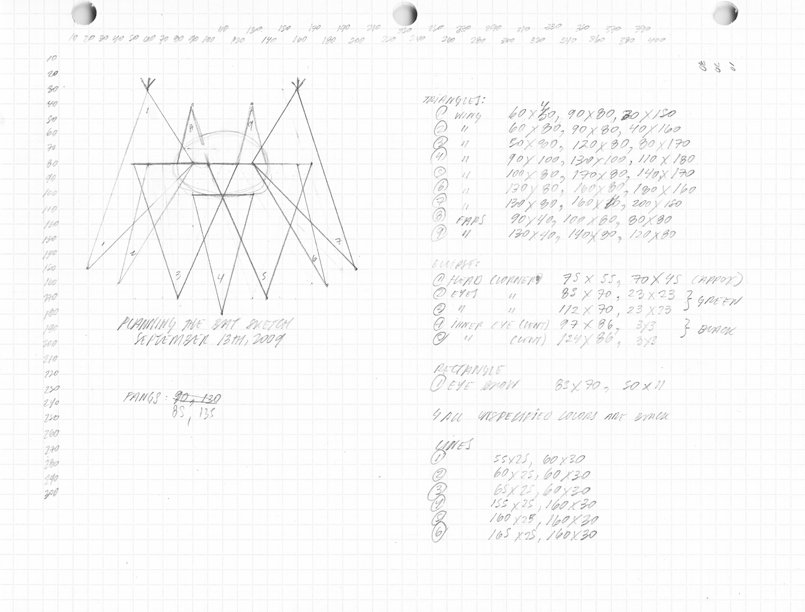
Today I worked on my first Processing sketch, which is this week's lab for my Introduction to Computational Media class. The objective of this first assignment was to use the 2D shape library available in Processing to draw a creature. This creation will then be used in the comings weeks for our explorations with animation and interactivity.

I read the first two chapters of the class textbook to jog my memory. In the process of reviewing this material I came across a suggestion to use graph paper as a metaphor for understanding the way a computer displays information. This led me to use graph paper in the design of my creature, dubbed Little Fangs. Here is a scan of the graph paper that I used as a planning tool.

Planning for Little Fangs

As you can see, I used this paper and a trusty old pencil to map out the shapes that would construct Little Fangs. I found this process very helpful because it helped me breakdown my creation into discrete and code-able parts - I knew exactly how many shapes I needed to create, along with their approximate sizes before I even started coding. That said, once I transferred the sketch into code I still had to play around with the dimensions. So, without further delay let me introduce you to Little Fangs.


To access the code for this creature just follow the link above to my page on the Open Processing website. Also, if you are attempting a similar starter project I suggest using a book from Ed Emberley for inspiration. Ed creates drawing books for kids that feature a bunch of stuff that can be drawn with simple shapes.

Sunday, September 13, 2009

Quick Overview of The Laws of Simplicity

Conversations regarding the need to manage and reduce complexity have been taking place in the computer industry for a long time now. Computers enable complexity to grow exponentially. The practices of information architecture and interaction design were developed to address this issue and to enable people and organizations to use computation as an effective communication medium.

Now that computation technology has become a pervasive element of our professional and personal lives, the complexity related to managing exponentially growing volumes of information has spilled over into our day-to-day life experience. Simplicity is becoming crucial to the maintenance of our own sanity.

John Maeda's book about simplicity outlines a set of useful "laws" and "keys" to help individuals and organizations better understand how to leverage simplicity - in both personal and professional realms. In the spirit of the laws outlined in this book, I will keep my overview as short as possible.

Before I dive into the rules I wanted to share a quote from Muji that I found on the book's website (www.lawsofsimplicity.com). To me this quote encapsulates an interesting perspective on simplicity that is at the core of John's vision of simplicity: "Muji is simplicity - but simplicity achieved through a complexity of thought and design."

The 10 Laws of Simplicity
  1. Reduce - simplest way to achieve simplicity
  2. Organize - helps disguise many things into fewer entities
  3. Time - saving time feels like simplicity
  4. Learn - knowledge makes things simpler
  5. Differences - simplicity and complexity are like yin & yang
  6. Context - simplicity is highly context-dependent
  7. Emotion - emotions are important to deliver simplicity
  8. Trust - trust makes things simpler
  9. Failure - some things can't be made simpler
  10. The one - "Simplicity is about subtracting the obvious, and adding the meaningful."
The 3 Keys 
  1. Away - Moving elements far away makes more appear like less
  2. Open - Openness reduces complexity by bringing to bear the power of many
  3. Power - Use less, freedom from power is the only to provide simplicity 
That pretty much covers the main concepts from the book. Before wrapping up I also want to go over three acronyms developed to provide strategies for the implementation of the reduce, organize and learn laws. 
  • To reduce complexity once all elements that can be removed have been removed, the next steps to take are shrinking, then hiding, and lastly embodying (SHE). This last step refers to the process of embedding the simplified object with a sense of value.
  • To use organization to reduce complexity four steps are outlined: sort, label, integrate, prioritize (SLIP). I prefer to call the second step "group" rather than "label" so that it is not confused with the first step. That, however, does away with John's acronym.  
  • To transfer knowledge in order to reduce complexity there are five things to keep in mind: Basics - cover the basics, Repeat - repeat information often, Avoid - avoid causing desperation, Inspire - use examples to inspire, Never - don't forget to repeat (BRAIN)

Saturday, September 12, 2009

Setting up the Arduino - Let There Be Light

After several days of impatient waiting for the parts kit to come in I finally set up my Arduino a few minutes ago.

I read the tutorial on the Arduino website to get started. This helped me recall what we covered in class. I felt pretty confident during the entire process and all went off without a hitch. My first program was an interaction of the traditional "blink" sketch. The only deviation I made from the code that Tom showed us in class was that I set different delay times for the LEDs.

After confirming that the chipset was connected and working properly, and after having played around with the delays times I took the next logical step of adding an LED light to the Arduino. Never thought I could be so happy from being able to turn on a tiny little light. Here is an exciting video of the LED light on my Arduino blinking at different rhythms:

Friday, September 11, 2009

Translating a physical computing idea into manageable parts

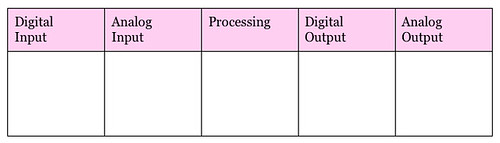
Earlier today I read the first chapters of the Introduction to Physical Computing course textbook (Physical Computing: Sensing and Controlling the Physical World with Computers). In the introduction of this book I came across two interesting frameworks intended to help designers describe their idea and identify all distinct elements of the interaction that need to be solved.

The first framework focuses on helping designers break down their idea into bite-sized chunks. To complete this simple chart a designer must identify the input, output and processing requirements for their project. Pretty basic stuff that is often forgotten in moments of late-night, last minute panic.

Defining Your Physical Computing Challenges
Interesting note on selecting between digital and analog inputs and outputs: if an interaction can be described using words related to discreet states (e.g. "either" or "or") then a digital I/O solution will usually suffice; however, if the input or output can only be described with words related to intensity (e.g. "stronger", "brighter", etc.) then an analogue I/O device will likely be needed.
The second framework maps the level of complexity associated to different types of projects. This simple 4-cell illustrates that projects increase in complexity when they involve parallel and analog processing.

Mapping Complexity based on Serial and Parallel, Digital and Analog

Introduction to Computational Media - 1st Class

Today I attended my first Introduction to Computational Media class. The goal of this class is to teach us the practice of transforming an idea into algorithm and then translating that algorithm into code. The process of transforming an idea entails breaking down the concept into distinct parts (e.g. input, output, and processing elements) that can be coded using a programming language. For this course the programming language we will use is Processing, which is a flavor of Java.

The professor of my class is Daniel Shiffman. Daniel is extremely passionate about the art and science of using computation as a communication medium. He is very involved in the Processing community and has even written a textbook for beginners, like myself. I look forward to learning how to code under his guidance.

The course is structured to cover core concepts related to programming during the weekly classes; hands-on coding experience is provided via weekly assignments that are executed and documented. Though there is no formal requirement to keep a blog or journal I have decided to do so, for my own benefit. Mandatory readings will be provided from the book Learning Processing, we will also be required to complete exercises from this book.

During the first 4 weeks we will focus on the fundamental concepts of programming. These concepts can be divided into three main categories:
  • Data: variable, arrays
  • Control/Action: conditional, loop
  • Organization: functions, objects (cross all categories)

After week 4 we will build on our application development skills via on-going practice using additional functionality provided by the processing library and Java.

Here is a link to the full syllabus. Here are my notes from todays class:

About Programming Languages

Programming languages are classified as high-level and low-level languages.
  • Low-level languages are faster and often provide direct access to resources such as memory. C and C++ are examples of low-level language. Machine language is the ultimate low-level language.
  • High-level languages are slower and more limited in their ability to access resources such as memory. Some high-level languages are cross-platform - e.g. Java and Javascript. Others are data flow based - e.g. Max/MSP/Jitter, PureData, Quant Composer
Processing, a high-level language, is an extension of Java that includes a graphics library and Integrated Development Environment (IDE) tailored for use by artists and designers. Java provides cross-platform/cross-OS (Operating System) compatibility by running applications through a Java Virtual Machine. Java programs run on top of another application that converts compiled Java code into a OS-appropriate machine readable format.

Processing is an Object Oriented Programming (OOP) language. This coding paradigm supports a modular approach programming that enables developers to create “objects” (small applications with behaviors and attributes) that can be utilized by other applications. OOP enables developers to reuse code more effectively - you know the old cliche "there is no need to re-invent the wheel". (C++ is also an OOP language.

Open Frameworks is a competitive offering to Processing that is based on C++. It contains an image library extension but, unlike processing, it does not include a simple IDE, forcing beginners to use feature-rich IDEs that complicate the learning process. The one benefit of using Open Frameworks is its superior video support.

Getting Started with Processing

Window coordinates start on the top left-hand corner of the window. As in geometry the x-axis refers to the horizontal axis, while the y-axis the vertical.

Functions in Processing follow the same overall syntax (sample below). Each function has predefined numbers and types of inputs and outputs.

functionName(argument 1, argument 2, argument 3, etc.);

In processing it is important to pay attention to the order of the functions in the code. The code is executed from top to bottom. So functions located closer to the top are executed first, which impacts the order of the layering of elements on the screen. Also, it is important to consider that changes to the color setting affect all elements further down in the code.
Here is an overview of color functions available in Processing. Each of these functions can accept from one to four arguments. If only one argument is present than the color will be in grayscale; two arguments are interpreted as grayscale with transparency (known as alpha); three arguments are read as an RGB value; four variables equates to RGBA (RGB with transparency. Each value can range from 0-255.
  • Fill(arg 1, arg 2, arg 3, arg 4); - fill form with color
  • Stroke(arg 1, arg 2, arg 3, arg 4); - color the line of a shape
  • Background(arg 1, arg 2, arg 3, arg 4); - color the background
This week's assignments include:
  • Signing up for the e-mail list
  • Downloading Processing IDE
  • Making a static drawing in processing
  • Check out Processing Monsters website (optional but fun)

Thursday, September 10, 2009

Introduction to Physical Computing - 1st Class

For a long time now I've fantasized about being able to build cool connected devices with embedded sensors, motors and actuators. This explains my excitement for the Introduction to Physical Computing course that started Yesterday. This course focuses on hands-on learning of physical computing concepts by providing students the opportunity to build and prototype devices using the Arduino chipset.

I was happy to get into to Tom Igoe's class. I already have two books written by Tom on this subject, our mandatory textbook (Physical Computing, Sensing and Controlling the Physical World with Computers, co-written by Dan O'Sullivan), and a release from the O'Reilly's Make series (Making Things Talk, Practical Methods for Connecting Physical Objects). Another important consideration, is that Tom seems to understand how to communicate/transfer his expertise to students who have little to no background in software and hardware development.

The course is structured to provide students with the opportunity to learn physical computing concepts during class, then to explore these concepts via numerous lab exercises, assignments/projects, and blog postings. Tom's book on Physical Computing (mentioned above) is the core textbook for this class; additional readings are taken from Don Norman's most popular books (The Design of Everyday Things and Emotional Design), and from Chris Crawford's "The Art of Interactive Design". Here is a link to the full syllabus.

On the first class, we covered all logistical considerations associated to the course. Important administrative considerations include the need to sign-up for a training session to use the shop, and for shop cleaning duty.

We began our foray into physical computing by exploring the definition of several important basic concepts associated. Considering that I am ignorant about circuits, this was very helpful for me. Next Tom took us through the development of our first two Arduino sketches (a.k.a. program). Both sketches were focused on turning on a LED on the Arduino, the second example involved adding a switch to control the LED.

Here is an overview of the concepts we covered:

  • Physical Computing is an approach to computing that enables human physical expressions, and other physical phenomena, to be used as a means of interaction with a computer system.
  • Microcontroller is a computer (such as the Arduino chipset) that can be customized with sensors, actuators and software to capture and communicate information.
  • Analog and Digital differ in that the former is continuous whereas the latter is discrete (e.g. 1's and 0's). Analog systems and objects can have digital characteristics and visce versa (e.g. an analog light switch can have an on and off state while a digital picture looks continuous as long as the resolution is high enough).
  • Resolution refers to how we perceive the world. More specifically, it refers to the level of discreetness at which we perceive the world. If the resolution is too fine then the user may not be able to notice, or appropriately impact, changes in the state of the device. On the other hand if the resolution is too coarse then the user may not be able to achieve the level of control desired.
  • Electricity and Electronics are related but distinct concepts. Electricity refers to the energy created by the flow of electric charge through a conductor. Electronics use changes in electrical energy to convey information.
  • Resistors are used to change the flow of electricity by resisting electric flow. This is important to ensure that electricity flows in the proper direction when a switch is closed considering that an electric charge always takes the shortest route to the ground.
  • Serial and Parallel refer to two different modes of activities and interactions. Serial events happen consecutively, while parallel events occur simultaneously.
This week's lab will include setting up my first breadboard and writing my first Arduino sketch. I also have to write a journal entry about a "sensor walk"; a walk around the city where we take a count of every interaction with a sensor that we see happening.

Wednesday, September 9, 2009

Applications of Interactive Telecommunications Technology - 1st Class

Yesterday, I attended the first session of the Applications of Interactive Telecommunications Technology course. This foundation course focuses on exploring the many ways that these technologies have been used by notable figures from a wide range of industries (in the form of product, service or concept) to support their artistic, personal and business endeavors. The course is taught by Red Burns, who is the chair of the ITP program and has been responsible for guiding the program's evolution.  It is also the only course that every first-year student attends together.

The sessions are structured into two one-hour and a half blocks: in the first part of the class student groups present a reaction to a topic discussed by a guest speaker from a previous session; during the second half a guest speaker is invited to share how they use (and have used) interactive telecommunications technology within their respective fields of expertise - the identity of the speakers is kept under wraps so we never know what the topic will be.

The main deliverables for this class are the presentation (My group is responsible for the presentation on the week of 12/8), and a paper inspired by or related to my experience riding a New York city bus (this is due on September 22 for my group).

Over the weekend I purchased the mandatory reading for this course, a short book by John Maeda called The Laws of Simplicity (blog associated to book). I have not finished reading the book yet, which is kind of embarrassing considering how short it is. At a high level, the book focuses on providing strategies to help individuals and organizations simplify products, services, and life in general. This addresses the longing for simplicity that has arisen as a response/reaction to the increasing level of complexity inherent in modern living, products and services.

On our first class we welcomed Vito Acconci as our special guests. Being somewhat (if not totally ignorant) about contemporary art, I was not familiar with him. Since the late 60s Vito has explored poetry, videos, installation art, and, his most recent medium of choice, architecture. His work across all of these phase carries through a provocative and playful perspective. What inspires me most about Vito is his courage to re-create himself and master new realms.

Let the fun (and pain) begin

It's time for the fun to begin because summer vacation is officially over. I know this sounds counterintuitive, for most of my life I dreaded the end of vacation. This year, however, the end of summer coincides with the beginning of my studies at the Interactive Telecommunications Program.

This new beginning is an important culmination of my efforts to forge a new, and more creative, professional path, and my desire to play an active role in guiding the evolution and design of technology to a more human place.

On a practical level, I will be spending my days building prototypes and tinkering with code rather than strategizing on how to create desire in order to generate sales of products people don't need (my jaded marketing professional background coming out in full force). Of equal importance, I will have the opportunity to collaborate with a bunch of intelligent people who share a passion for technology, creativity, and exploration. The highlight of this first week has been to meet all of this diverse group of individuals. Here is brief overview of the background of the first year students at ITP:

Country of Origin:

  • Brazil
  • Canada
  • Chile
  • China
  • Denmark
  • England
  • Germany
  • Greece
  • Indonesia
  • Israel
  • Japan
  • South Korea
  • Malaysia
  • Mexico
  • Taiwan
  • Turkey
  • USA

Professional and academic backgrounds include:

  • Architecture
  • Dance
  • Illustration
  • Music
  • New media
  • Sculpture
  • Video
  • Animation
  • Math
  • Fashion Design
  • Business
  • Non-Profit work
  • Theatre
  • Industrial Design
  • Interior design
  • Communications
  • Film
  • journalism
  • Writing
  • Engineering
  • Photography
  • Calligraphy
  • Creative writing

As far as this journal is concerned I will be posting more frequently than ever. This will continue to be the place where I will share my experiences, ideas and projects related to the intersection of technology, design, and culture. To facilitate access to relevant content/topics I will organize my posts using course and topic tags. Here is a list of the course tags for the Fall 2009 semester:

  • Introduction to Physical Computing: ITP-IntroPhysicalComp
  • Introduction to Computational Media: ITP- IntroCompMedia
  • Comm Lab: ITP-CommLab
  • Applications of Interactive Telecommunications Technologies: ITP-ApplicationsITT

Sunday, August 16, 2009

Adam Greenfield's Principles of Ubiquitous Computing

Since I was introduced to Adam Greenfield via the July/August issue of Interactions magazine I have been searching for more content from him - essentially, I am trying to catch up on the last few years of Adam's writings regarding ubicomp since he offers unique and informed perspectives on this emergent phenomena. Needless to say, I have a long ways to go because much has been written and said by Mr. Greenfield.

Taking it one step at time, here I am going to focus on a set of principles for the design and implementation of ubiquitous computing that he has developed. These principles were shared back in 2006 in a talk that he gave titled Here, There and Everywhere: Issues in Cross-Cultural Ubiquitous Computing, which was delivered shortly after he wrote his first book.

I suspect that many of these ideas are captured in his book in greater depth, I will confirm that this is the case as soon as I get around to reading Everyware. I came across this information on the We Make Money Not Art blog, here is a direct link to the article.

What is the purpose and role of these principles: now that ubicomp is actually becoming ubiquitous it is important that devices and applications that deliver this type of computation are considerate to a human being's needs, desires, aspirations and dignity. In Adam's own words these "principles are just codifications of common sense and basic neighborly virtues, expressed in language appropriate to the domain of application. The best, smartest and most ethical developers have never needed guidelines to do the right thing."

Without further ado, here they are (please note that these have been taken verbatim from the We Make Money Not Art blog):
  1. Default to Harmlessness - in a world where it is possible for a device to broadcast your most intimate details, user's safety (physical, psychic and financial) must be ensured.
  2. Be Self-Disclosing - ubiquitous systems should be technically and graphically self-disclosing, so that users are empowered to make informed decisions.
  3. Be Conservative of Face - ubiquitous systems must not unnecessarily embarass, humiliate, or shame their users.
  4. Be Conservative of Time - Ubiquitous systems must not introduce undue complications into ordinary operations and should ba respectful of our time.
  5. Be Deniable - Ubiquitous systems must offer users the ability to opt out, always and at any point.

Friday, August 7, 2009

Sixth Sense Mobile Interface

In February of this year I posted a video from Wired regarding a new wearable computing prototype that has been recently dubbed "SixthSense". This device was developed by an MIT Media Lab student named is Pranav Mistry. Recently I came across a video from TED, which was posted in March, that goes a little bit deeper into this invention. Since this is a really cool idea I've decided to share this new (or at least newer) video here.

Thursday, August 6, 2009

Adam Greenfield on the Rise of Ubiquitous Computing

In the July issue of Interactions magazine I came across an interview with Adam Greenfield. The article, titled At the End of the World Plant a Tree, featured six questions from a lengthy interview that was conducted by Tish Shute in February of this year. As soon as I finished reading this condensed version I made my way to UgoTrade.com to access the full interview, which is well worth the time.

This interview was my introduction to Greenfield and many of his fascinating and thought-provoking ideas. Adam is currently leading Nokia's design direction for services and user-interface. The
 focus of this piece is on ideas that he explores in his soon to be released book The City is Here for You To Use.

This upcoming release is Adam's second book, he also keeps a blog called Speedbird and has released an interesting pamphlet called "Urban Computing and Its Discontents". All of his publications investigate the potential shape and impact of ubi-comp on modern life. His first book, titled Everyware: The Dawning Age of Ubiquitous Computing, often made it into my amazon cart, though I never choose to purchase it due to my lack of familiarity with Adam (this is something I plan to remedy shortly).

Interesting topics covered in the interview:
  • Definition of relevant concepts such as "onto" and "ontomes". Ontomes refer to a global environment of addressable, queryable, scriptable objects (e.g. the class of objects), while onto refers to any given such object that is part of this environment (e.g. an object instance). These terms are closely related to the concept of "spimes" that was created by Bruce Sterling.
  • Conversations regarding evolving perspectives regarding the nature of ubiquitous systems. From Mark Weiser's vision of computers fading into the background, where they appear when needed and disappear when not in use, to Yvonne Rogers’ vision of computers supporting engaged living, helping people engage more actively in things that they do rather than do things for them.
  • Discussion regarding Greenfield's principles of ubiquitous computing. These principles are ultimately "codifications of common sense and basic neighborly virtues, expressed in language appropriate to the domain of application."
  • Viewpoints on the potential impact of ubiquitous technologies on our society's ability to instigate the necessary changes to create sustainable living practices and lifestyles. Adam's view on this topic is quite skeptical. "sometime in the next sixty years or so a convergence of Extremely Bad Circumstances is going to put an effective end to our ability to conduct highly ordered and highly energy-intensive civilization on this planet." 
  • Concerns regarding how to enable individuals to manage privacy at three distinct levels: secrecy ("data [that] should not be readable by or understandable by anybody except me or people I designate"), anonymity ("data [that] should be seen by anybody but about whom it is should be knowable only by me or people that I designate"), and autonomy ("my right to live under circumstances which reinforce my sense that I am in control of my own fate"). 
[picture taken by Pepe Makkonen]

Tuesday, August 4, 2009

Data Should Inform But Not Determine

In this entry I will continue to explore the implications of the growing trend related to the creation of measurement and tracking systems for the optimization of life. On my previous post I failed to adress the impact of our decisions regarding what to measure on the way we lead our lives.

As we continue to leverage data to support and guide our actions and decisions, the selection of what to measure will become increasingly important. What we measure will identify what we deem to be most important, and will provide a foundation for our actions and decision making. In other words, the data will serve as a reflection of our world view as well as a basis for the reality that we strive to bring into existence in our life.

As a consequence the information systems that we create, which processes this information, will also grow in importance. It will play an enabling and limiting role in our lives. In the word of Terry Winograd , in "designing information systems we design ways of being." This will be more true than ever before as technology encroaches in the day-to-day lives of most individuals (at least in industrialized nations), no longer relegated to professional organizations and pursuits. Lawrence Lessig shared the same idea in his famous quote "code is law".

What does this all mean to me - it is now more important than ever that the creation of information systems be guided by the interests and active involvement of people that come from all different avenues within our society (rather than merely engineers, developers and programmers). 

Also, echoing a sentiment from my previous post, as individuals we need to remember to empower ourselves rather than data from outside. We can't loose sight that the data we are capturing and processing is ultimately nothing more than a guide posts that we have selected. The choices we make should be informed by data but not determined by it.

Friday, July 31, 2009

Excitement Continues to Build for ITP

Preparations continue for the Interactive Telecommunications Program that I will be starting in September, and the excitement builds with every action I take. Earlier today I was checking the course descriptions and calendar for the fall 2009 semester, which have recently become available. During this process I felt giddy like a geeky kid in a high-tech toy store. 

The focus of my activities today were on better acquainting myself with the core requirements that I will need to take in the first and second semesters. In college, these requirements are usually courses that people do not want to take but are required to because of a need to ensure that everyone receives a well-rounded education. 

At ITP the foundation courses focus on building a basic understanding regarding the applications of interactive technologies, the use of computation as a medium, and skills required for programming software and building hardware. Below are brief overviews taken from the course descriptions of the four core requirements. I can't wait to get started. 

Applications of Interactive Telecommunications Technology
This introductory class is designed to allow students to engage in a critical dialogue with leaders drawn from the artistic, non-profit and commercial sectors of the new media field, and to learn the value of collaborative projects by undertaking group presentations in response to issues raised by the guest speakers.

Introduction to Computational Media
What can computation add to human communication? Creating computer applications, instead of just using them, will give you a deeper understanding of the essential possibilities of computation. The course focuses on the fundamentals of programming the computer (variables, conditionals, iteration, functions, and objects) and then touches on some more advanced techniques such as text parsing, image processing, networking, computer vision, and serial communication.

Introduction to Physical Computing
This course expands the students' palette for physical interaction design with computational media. We look away from the limitations of the mouse, keyboard and monitor interface of today's computers, and start instead with the expressive capabilities of the human body. We consider uses of the computer for more than just information retrieval and processing, and at locations other than the home or the office.

Comm Lab
An introductory course designed to provide students with hands-on experience using various technologies including social software and web development, digital imaging, audio, video and animation. The forms and uses of new communications technologies are explored in a laboratory context of experimentation and discussion.

Monitoring, Tracking, and Behavior Changing

During the past several months there has been an upsurge in interest about the behavioral changing potential offered by new monitoring and tracking technologies.

The July issue of Wired magazine ran a cover story titled "Living by Numbers: Track your data. Analyze results. Optimize your life. " This piece focused on the emergence of monitoring and tracking technologies that have become available across a wide range of areas. Recent issues of Make and Interactions, respectively titled "Remake America" and "The Waste Manifesto", magazines also focused on possibilities created by these technologies to help us reduce waste and live in more a more sustainable manner.

These technologies enable individuals and communities to generate data regarding various types of activities and the impact of these activities, and then to leverage this data for various purposes ranging from behavioral change (e.g. tracking your runs for performance improvement, as in Nike+ ), to scientific research (e.g. making available personal data for aggregate analysis) and artistic self-expression (e.g. capturing data for lifestreaming, a la Nicholas Feltron).

These various new technologies provide us the opportunity to understand more about, and to impact, our current behavior at individual and community levels. However, the existence of these technologies is not sufficient to drive positive change. we must now design and discover compelling and effective ways to implement these technologies to help individuals and communities to achieve their goals. Articles in both Wired and Make magazines showcase examples where the sharing of data, and the development of games related to this sharing, has helped drive change for individuals and communities.

As we look for opportunities to dissect and analyze our life with these tools we need to be mindful that not everything can be parsed into measurable units for tracking and monitoring.

Life is much more than what can be grasped and measured by our rational mind. We need to remember that all the optimizing in the world is not the solution to make us happier or more fulfilled. If we reduce our experience of life and reality to metrics (in the form of numbers and words) that our mind can easily classify and optimize we will miss out on an important part of the experience of life, which is unmeasurable. At least that is my half-assed new age-y spiritual beliefs lead me to surmise.

Monday, July 27, 2009

Always Addicted to Being Always On

I am spoiled and I can't blame it on my parents. Over the past several years I have become accustomed to having constant access to my own and others' information from anywhere at anytime. More than being spoiled, I am an addict. I am part of a large and growing community of addicts from throughout the United States and other developed countries who have adopted the habit of being "always on".

Actually, we've taken this one step further. We have bought into the belief that being "always on" is an important evolutionary leap for mankind, not to mention a basic human right. I (sorry, I meant we) demand the right to have immediate access to answers for all questions, no matter how useless, and to be able to stream information about our lives, no matter how boring. I became aware of my sorry predicament during a month-long trip through Asia and Europe this summer.

I wish that this insight had surfaced through a moment of stillness and clarity. However, it was actually crystalized through the experience of several moments of techno-rage. This included multiple instances where my wife had to talk me off the proverbial edge. Actually, it was my iPhone that was on the edge of getting smashed against walls, tables, windows and other parts of various hotel rooms.

Everyone of these moments were instigated by my struggle to find and remain connected to the internet. Moments where I asked for nothing more than the ability to exercise what I believed was my inalienable human right to remain "always on." No matter how much I prayed to the techno-gods, or how many Balinese style offerings I conjured up for them, it was all to no avail.

In the end of it all, this experience helped me realize once again that being "always on" is just as bad as it is good. That is not to say that I overcame my addiction. Just like any good addict I love my addiction and have made every effort to remain "always on" since I have arrived in Brazil to visit my parents.

iPhone's Lackluster Performance as Communication Hub for World Tour

The first and longest part of our world tour is now officially finished. During this part of our trip I used a jailbroken first-generation iPhone as my personal communication hub. I chose this device because it is extremelly portable and I believed that it would enable me to capture snapshots, lo-res video, and audio snippets, it would serve as a platform for the posting of journal entries, it would support the tracking of our budget, and it would allow us to take a good amount of our favorite music and videos with us on the trip.

I knew that there were many downsides to selecting the iPhone as my communication platform. The main ones of which I was aware were limited functionality and application availability compared to a laptop or netbook, and small form factor which makes it tiring to use for development of longer form content (I guess the content I developed is more like mid-form content).

So how did the iPhone do? The results were mixed and if I had to do it over again I would definitely bring along a netbook to complement this device as a communication hub.

The shortfalls were many. First and foremost, much of the iPhone's functionality is dependent on the availability of wireless internet connections and does not support connection to online via ethernet ports. This was an issue due to the scarcity of wireless connections (both cell-based and wifi) throughout the trip. Thus, when I would write blog posts using the notes application there was no way for me to transfer this content to computers that had hardline internet connections. This was by far the biggest issue I encountered.

Other inconveniences included the lack of cut and paste functionality, problems with the video application on my phone, and issues related to storage space (which I was eventually able to overcome using the terminal application on the phone).

On the positive side, the iPhone featured applications that met most, though not all, of my requirements - the picture, blogging and financial tracking applications were usable and useful. The jailbroken phone also worked well with local GSM sim cards, enabling me to stay in touch with my friends throughout the trip.

Sunday, June 7, 2009

Testing, Testing 1 2 3

This short post is a test of the BlogPress app on my jailbroken iPhone. This is part of my continuing preparations for our World Tour. I am considering using this application to publish blog posts while travelling. Let's see how it works.


This is a test picture to determine how the photo upload functionality works.

*Mobile Post from 2009 World Tour*

Saturday, June 6, 2009

Mapping the Tour

The preparations for the world tour continue at a frantic pace. Over the past several days I've focused my attention on creating a Google map the includes all of the destinations that we've planned so far. This map features the locations and the trajectory of our trip. I've even included short description for each element on the map. You can even find contact information of our accommodations, where appropriate; when it is not personal to respect the privacy of the friends who we are visiting in Japan and Turkey.

This map will be a living tool that will be updated throughout the trip with stories about our experiences and the places that we visit in each stop of our tour. For now, it provides an interesting visual perspective regarding the trip that we have planned. This map is a way to bring this trip to life that helps us visualize and plan the trip, and share our vision and experiences with friends and families.


View Julio & Lauren's 2009 World Tour in a larger map

I have not made much progress in the next steps that I identified earlier this week. Here is a quick updates of the baby steps that have been taken:
  • I've identified the following applications for capturing and publishing video and images on the iPhone: for video I plan to use Video Recorder V3.0, which is available only for jailbroken iPhones. This application (pictured on the side) enables capture of long low-resolution 14fps videos and supports direct upload to YouTube. To capture pictures I will use the standard camera application; the Mobile Photos application will be on hand to support upload of pictures to flickr. From a sound perspective I am testing out TweetMic. This application creates tweets with links to an uploaded version of the recorded audio file.  I have not found a solution to post any of these types of media directly to our Tour blog, nor for publishing written blog posts.
  • By the end of the weekend our official World Tour travel blog will be up and running (I only half belief this claim at this point in time, but I am willing to continue being optimistic about it). Lastly, I have not yet finished developing a list of additional technology requirements such as cameras, book readers - but I think we will have little more than a second iPhone and a camera in terms of additional technological gadgets.

Thursday, June 4, 2009

Easy iPhone Ringtone Hack

I recently learned the easy and free way to create ringtones for a non-jailbroken iPhone. I know I'm behind the curve on this one but I'm sure there are others out there like me.

Each ringtone is actually just a short (30-second or less) sound file that is saved in Apple's proprietary ACC format with a "m4r" extension, as opposed to the original extension "m4a". The iPhone automatically recognizes any files in it's library with this extension as a ringtone.

So how do you prep and convert a standard music file into a ringtone? Here is a link to two sites that provide a clear outline of this process. Now you are free to rock whatever ringtone you want on your iPhone.

Using GarageBand
Here is a link to a post on the Lifehacker blog regarding how to use GarageBand (version 4.1.1 or newer) to create a ringtone from existing music files. If you have GarageBand this is definitely the better and easier way to do this.  Link: http://lifehacker.com/334073/create-custom-iphone-ringtones-the-free-and-apple-way

Using iTunes Only
Here is the alternate way to accomplish the same thing. In this scenario you don't need GarageBand - you do it all through iTunes. The one important limitation is that this will only work on unprotected music files such as mp3s. Link: http://theappleblog.com/2008/08/07/free-custom-iphone-ringtones-using-only-itunes/

Wednesday, June 3, 2009

Reading List: Interactions, March & April 2009

It has been a long time since I've posted anything regarding my readings lists (or my Interaction Design exercises for that matter). Today l'll focus on addressing the first of these deficiencies by sharing my reading list from Interactions March/April issue (I've already read the May/June issue but don't want to get ahead of myself).

Article 1: Problems before patterns: a different look at Christopher Alexander and Pattern Languages
In this piece Molly Wright Steenson examines Christopher Alexander's notion of pattern languages, and the importance of the  problem definition element of a pattern. So what the hell are pattern languages? Pattern languages are developed to help non-experts participate in the design process. Patterns are self-contained entities that describes a problem that reoccurs within a given environment. The pattern also contains the core solution that enables the people to use this same solution "a million times over, without ever doing it the same way twice." If anyone knows of other good resources on this topic please leave a comment.

Article 2: Embodied Child Computer Interaction: Why Embodiment Matters
The next interesting piece from this issue comes from Alissa Antle. In this article she explores the importance of embodiment in child computer interaction, and the cognitive role the embodiment plays in general. Alissa also investigates briefly opportunities that are afforded via embodied interactions and cognition (check out more about The concept of embodiment from my previous posts regarding Dourish' book).

Article 3 and 4: Identity theft and the challenges of caring for your virtual self and The Ambient Mirror: creating a digital self-image through pervasive technologies
These two piece are part of this issue's focus on privacy and security in our digitally connected society.

The first piece, by , adresses the security of the digital representations we create to communicate our identities in the virtual world of bits and bites. These representations encompass our profiles on ecommerce and media sites, as well as our data from social networks. One interesting area that is explored by Jennifer is how individuals are often positioned as the source of identity theft, despite the systematic prioritization of profits and self-interest on the part of organizations who hold the data.

Dimitris Grammenos's piece offers an interesting exploration regarding how pervasive computing may impact our lives, as it continues its invasion of our physical and social worlds. The world he paints is a stark contrast to the notions of Big Brother. He examines how pervasive technologies, embodied by the idea of an "ambient mirror", could augment and enhance our lives - from extending our memory to self-knowledge and improvement. He also briefly addresses social considerations of such a technology.

Article 5: Taking a broader view of the human experience
Mark Vanderbeeken provides a valuable counter-perspective to most designer's narrow focus on usability (and aesthetics) at the expense of broader human considerations such as technology, ethics, economics, culture, belief systems and sustainability. The broadening of our perspective is crucial for designers to be able to play a positive and constructive role in shaping our fast paced

Monday, June 1, 2009

Jailbreaking and Calendar Making

Technology planning for our world tour continues unabated as our departure date looms closer and closer. I'm happy to report some progress and successes have been made during the past few days with my old iPhone and the World Tour calendar.

First and foremost I was able to get my jailbroken iPhone to work on T-mobile's network. I received a PrePaid sim card that worked with little fanfare. That's right, I am no longer a captive prisoner held back by ridiculous contracts and code. This is an important development because I now know that I can use this phone with third party GSM sim cards from around the world during our world tour.

For anyone who is interested in learning more about how to jailbreak your iPhone here is the set of resources that I used. It was pretty straightforward, the heavy lifting has been done by others.

Please note that there are risks inherent in this process and I cannot vouch that it will work on your phone nor can I guarantee that it won't have negative long term impact on your device. In other words, do this at your own risk.

The most helpful resource that I discovered was the iPhone Blog. Here you can find step by step instructions on how to jailbreak your iPhone using the Pwnage tool. Make sure to read all the the instructions once over before you attempt to jailbreak your iPhone. I believe there is little risks of permanent damage. However, you may end up having to do it several times as I was forced to.

Another helpful resource is the modmyi.com's wiki Pwnage 2.x Guide page. This resource also features step by step instructions on how to jailbreak your iPhone. However, I think the instructions featured here only work if you have previously jailbroken your iPhone using Pwnage (they differ in only one way from the instructions on the iPhone Blog, which did work for me).

The second area in which I have been making some progress is on the official tour calendar. I've set this up using google calendar and it includes all locations, flights, and dates from our trip. I've also created a second calendar with logistical information for Lauren and me (e.g. hotel names, wedding even schedules, etc). The purpose of this calendar is to serve as a planning and sharing tool. Here is a link to the latest and greatest version:


Here is my next steps for this week:
  • Identify capture and publishing solutions for audio, video, images, and text on iPhone.
  • Create blog and test out the publishing solutions.
  • Develop list of additional technology requirements such as cameras, book readers.

Wednesday, May 27, 2009

Dancing and Traveling

During the past several weeks I have been devoting less time to my interaction and experience design journal for two reasons: Lauren and I have been planning an around the world the trip for this summer; and we have been rehearsing for a dance performance that we delivered at a friend's wedding this past weekend.

The good news is that these preparations are coming to an end. The not so good news is that I won't be able to get back to my curriculum because I've decided to take a detour and focus on considering what aspects of technology, culture, design, and experiences I can explore during our trip around to world.

There are two main perspectives on digital communication technologies that I want to explore: first, I want to leverage technology to capture and share my and Lauren's experiences; second, I want to investigate how different cultures relate to technology and are designing and adopting technology to support local endeavors.

From a personal perspective I am looking for a mobile/portable solution that will enable me to capture and publish experiences from this trip. This solution will include multiple hardware and software products. Here is a brief overview of the tools currently under consideration:
  • Personal communication hub: the main contender for my personal communication hub is my first generation (aka 2G) jailbroken iPhone. This device would enable me to capture quick snapshots, lo-res video, audio, and journal entries. The main downside of selecting the iPhone as my platform is that I will not be able to publish directly from the iPhone, even in a wifi area, as I have not found any acceptable blogging apps. A secondary drawback is that the 2G iPhone has lower quality audio and video capabilities (available on jailbroken phones only), and no GPS. I am not willing to take a laptop due to considerations related to portability (we'll be on a 34-day trip) and theft.
  • Additional devices: I will also definitely take a camera for higher quality photos and video. I am uncertain about whether I will be willing to invest in a new Canon G10 - the temptation is strong, it is hard to resist. We will likely take our existing camera as well, a Canon SD950.
  • Publishing tools: to publish all of the content that we capture and create I plan to use several platforms including a blog (on blogger), my existing flickr account, google calendar and maps, daytum, and youtube; I'm still considering if and how to integrate twitter and facebook without driving myself crazy.
From an observer's perspective (with no real claim of being objective) I want to explore how people from different cultures leverage familiar technologies in different ways; and what different technologies they have developed that are specific to local contexts.

For example, how are mobile phones used differently based on local cultural, and economic contexts; what different services are available, and how have they adapted other services to meet their needs; what meaning does the society ascribe to cell phones.

Over the next three weeks I will share more about the technology-related aspects of the planning for this trip. Once we are off I will also document how technology ultimately enhanced, or totally screwed up, our trip (after all I do believe that technology can be both a force of good and evil).

Friday, May 15, 2009

Statement of Purpose for ITP

I am excited for this opportunity to share with you more about what I am up to. Below I have posted the statement of purpose that I submitted with my application to the Interactive Telecommunications Program at NYU.

Writing this piece was difficult and cathartic. It required that I take a long and hard look at the reasons why I am pursuing this goal, and do a good bit of soul searching to identify which questions I want to explore in this program. This process forced me to start to crystalize what I want to create through my involvement at ITP. At the end of it all, I was more excited and energized than ever to pursue this path.

Over the next two years I will work to bring into existence many of the possibilities that I discuss in this piece. I look forward to sharing my experiences while on this journey, both the successes and failures. Not to mention that I'm sure I'll need guinea pigs from time to time. My only request in sharing this with you is that you feel free to share your own thoughts and ideas in return.

Statement of Purpose

"I’ve cultivated a passion for design and technology since I was teenager. My interest in design has inspired me to undertake numerous personal projects spanning industrial, graphic, web, and sound design, while my passion for technology has supplied valuable tools that have supported my projects and opened doors to new experiences. The increasingly pervasive role that technology plays in my life has given me a deeper understanding of the ways in which people engage with technology. As users of technology, we constantly shift between acting “through” it, as a tool, and acting “on” it, as an object of engagement itself.

I have become fascinated with the possibility of combining these passions in a new configuration: acting “through” design in order to act “on” technology. It is evident to me that the Interactive Telecommunications Program at New York University is the right place for me to explore this convergence of design and technology.

My interest in harnessing the power of design to enhance technology is not for technology’s own sake. It is driven by a belief that technology can have positive and negative consequences. Designers have an important role to play in shaping the evolution of technology by appropriately designing our interactions with, and through, technology.

On a personal level, I am inspired by the power of technology to enable connections between people, and to communicate meaning in engaging new ways. My iPhone has revolutionized the way I stay connected to people, content and places, and has also altered my expectations regarding their accessibility. The Nintendo Wii, by designing interactions that mimic the familiar gestures we use to do things in the physical world, enabled me to connect with friends who had no previous interest in video games.

The power of technology is ever more defined by its ability to connect people to other people, communities, and organizations. As a marketing communications professional I have realized that people have become empowered by technology to challenge the control once held by corporations over distribution of information. Traditional marketing communications now compete with the voices of millions of individuals, who on an aggregate level have a higher degree of credibility. At the same time, the connective power of technology has enabled the fragmentation of society into distinct communities that subscribe to different beliefs and value systems.

These are some of the realizations that have sparked my desire to experiment with design of technology-based interactions and experiences. My pursuit of this goal is driven by passion, curiosity, discipline, and integrity.

I designed a three-year plan and curriculum to channel my passion and curiosity in a disciplined manner. The first phase, currently in progress, is focused on building a theoretical foundation of knowledge through consumption and production of content that supports the development of an analytical design-perspective. The second phase concentrates on development of design production skills using a project-based approach that provides opportunities for learning through practice. The curriculum will then culminate with a focus on creativity driven by an integration of my analytical and production skills through continuous theoretical and hands-on engagement.

I have used similar strategies to achieve other important personal goals. When I moved to New York City in January of 1999, I created a similar plan to pursue DJing. After three years I was transformed from having no knowledge of how to spin records to moonlighting as a DJ with bi-weekly residences at popular parties in downtown lounges and clubs.

These pursuits have other important features in common: a genuine desire to share something of great personal value, and a focus on integrity. Sharing the joy and energy that music brought to my life was key to my success as a DJ. Acting with integrity also contributed to my accomplishments, though until recently I failed to notice that my actions did not support this same goal at a community level. I’ve realized that acting with integrity includes not only standing by my own promises. It also requires holding others accountable for their commitments. I failed to notice that I had too often sacrificed my authenticity and honesty because I was afraid of hurting someone’s feelings or not being liked.

This failure undermined my ability to grow as a leader and to contribute to the growth of other individuals within my personal and professional communities. Now, while I still place emphasis on getting along with others, I am also conscious that my integrity depends on direct and honest communications.

My interest in human growth and development is one of my main inspirations for applying to ITP. Beyond investigating how to improve interfaces with machines, I want to explore how technology can enhance the way human beings experience the world. How can technology create constructive new ways for people to communicate? How can we guide its continued expansion into our physical and social worlds so that it has a positive impact on the way we conceive and communicate our identity and individuality? How can it help to transform our consciousness so we depend less on a conditioned response and become more actively engaged?

I also want to explore how technology can be made accessible to a greater number of people. How can we create new and more natural and delightful ways for human beings to interact with computational devices? How can we enable communities of people who have special needs such as illiteracy or disability to interact with computational devices?

I know that the Interactive Telecommunications Program at NYU would provide me with unrivaled opportunities to investigate these areas of interest. I am attracted by the program’s focus on hands-on experimentation and the self-directed project-based framework on which it is built. I have limited experience writing code and building physical computing devices, but I have passion and desire to learn, which is evidenced by the assortment of cell phones and computers I’ve collected for hacking.

I have already started down the path of interaction design, and I would consider it an honor if I could integrate studies at ITP into my journey. In return I am eager to dedicate my passion, energy, commitment, and contagious optimism to ensure the continued success of this program."

Monday, May 11, 2009

Back to School at the Interactive Telecommunications Program at NYU

I'm going back to school. I am officially enrolled in the Interactive Telecommunications Program at the Tisch School of Arts at NYU. This is an extremely exciting and valuable opportunity for me. It is an ideal compliment to my personal interaction and experience design curriculum.

This program affords me the chance to develop practical know-how regarding how to create engaging and valuable experiences using communication technologies. My existing theory-based (know-that) knowledge, accumulated from much reading and writing during the past 8 months, should come in handy.

Here is a brief overview of what the program's mission (straight from their own website): "to explore the imaginative use of communications technologies — how they might augment, improve, and bring delight and art into people’s lives. Perhaps the best way to describe us is as a Center for the Recently Possible."

This event has several implications for this blog. From a content perspective, I will begin to post information related to my ITP experience. All of these entries will be tagged with the label ITP .  I will begin this series by posting my statement of purpose. Then I will share project ideas and questions I find worth exploring. I hope that this will help me refine my thoughts and ideas.

The last and most superficial impact of this event is a title change for this blog. I am currently planning to change form Learning Interaction and Experience Design to Technology/Culture/Design/Experience. This is officially the "acting" tile; which means that any day now it can be replaced by the actual title (if organizations can do this with their employees why can't organisms do the same with our own resources, such as blog titles).

That's all for tonight, I am suffering from a mild mental blockage (it took me over an hour to write this short post). I will have much more to say about ITP over the coming months.

Thursday, May 7, 2009

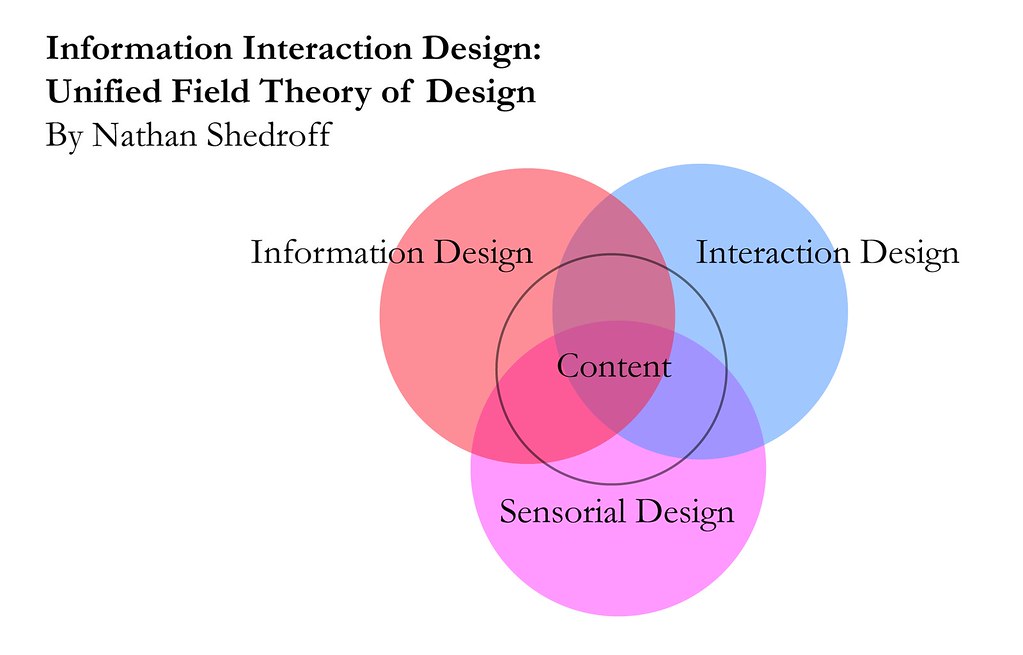
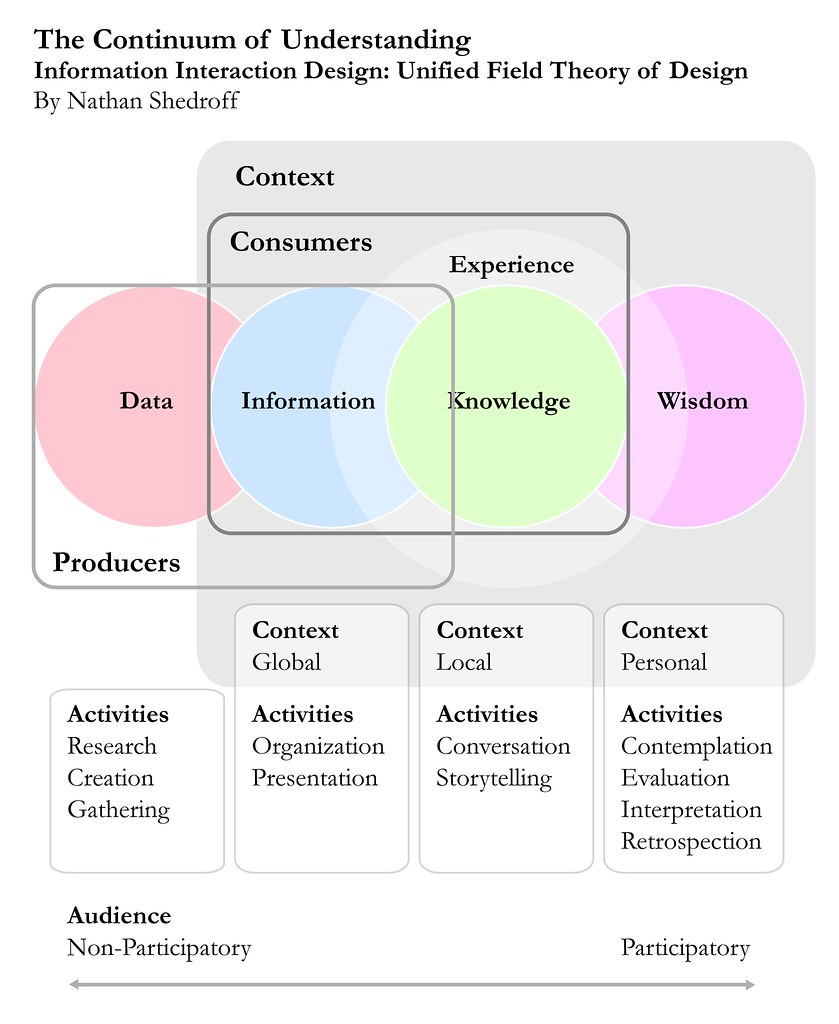
ID FMP: Unified Theory of Design

Nathan Shedroff offers a valuable unified theory of design that brings together information, interaction, and sensorial design. This theory is based on the premise that leveraging existing and creating new ways to organize and present data and information is a process that is roughly the same across media.

The intent of this theory is to enable people to create “valuable, compelling, and empowering information and experiences for others.” (Shedroff believes that these design skill are crucial for success in modern society.) In order to create these experiences people need to have a message and a reason for communicating it

The relationship between information, interaction and sensorial design disciplines is visualized as a Venn diagram. Each discipline encompasses different types of expertise. To create compelling content and engaging experiences designers need to bring to bear skills from all of these realms.

I classify this theory as an experience design framework because it brings together all disciplines required to created compelling communications and engaging experiences. Nathan has developed other valuable experience design-focused frameworks that I will explore in future posts.

First off, I’ll provide and overview of Shedroff’s definition for information, interaction, and sensorial design. Then I’ll delve deeper into each of these disciplines to explore relevant concepts and frameworks.

Overview of Information, Interaction, and Sensorial Design
  • “Information design addresses the organization and presentation of data: its transformation into valuable, meaningful information.” Information design has been practiced by graphic designers and publishers for a long time, though they rarely identified these practices as a distinct discipline. Recently this discipline has become more importance due to the proliferation of data, and the need to synthesize this data into information, knowledge, and ultimately wisdom.
  • Interaction design is “essentially story-creating and telling, [that] is both an ancient art and a new technology.” Interaction design for many traditional media such as print, TV and outdoor is limited and guided by existing conventions. Interaction design has long been practiced by industrial designers and live performers, though they did not identify it as its own discipline. The new possibilities for interaction offered by interactive technologies have increased the importance of interaction design.
  • “Sensorial design is simply the employment of all techniques with which we communicate to others through our senses.” This includes writing, visual techniques (e.g. graphic design, animations, and videography), sounds, smells, tactile feel (e.g. industrial design, and material selection). Sensorial design disciplines have their own histories, concerns and practices. The traditional focus of most design disciplines is on sensorial design. That said, most great designers had an understanding regarding information and interaction design, even if they did not recognize these practices as distinct disciplines.
Information Design
“An understanding of information design starts with the essential view that the vast amount of things that bombard our senses everyday are not pieces of information but merely data.” To transform data into information it needs to be organized, and presented in an appropriate context that can give it meaning. Information can be consumed via experiences that generate knowledge. Experiences can then eventually generate wisdom.

The Continuum of Understanding
Data and information are both part of a continuum of understanding. This continuum maps the relationship between four different levels of understanding: data, information, knowledge, and wisdom.


Data represents the lowest level of understanding along this continuum. It is the “raw material we find or create” to build our communications. By itself data does not contain a complete message and is inconsequential and boring. For these reasons data is mostly useful to people who produce content.

Data is transformed into information when it is organized and presented in a context that makes relationships and patterns visible and delivers meaning. Producers of information determine what data is used guided by their own goals and conceptual models. On the other hand, consumers determine how the information is consumed and evaluated according to their own goals and mental models.

The next ladder up on the continuum is knowledge. Knowledge refers to the understanding that we gain through experience. It is created by the integration of information with our existing mental models and understandings. Knowledge is participatory level of communication that can be individual or shared. As such, it can only be communicated through compelling interactions that enable people to identify patterns and meanings in information.

The highest, most intimate and vague level of understanding is Wisdom. Less is known about it than any other level, other than it is more abstract and philosophical. “Wisdom is a kind of ‘meta-knowledge’ of processes and relationships gained through experiences. It is the result of contemplation, evaluation, retrospection, and interpretation – all of which are particularly personal processes.” Unlike knowledge, wisdom is hard to share, and occurs at an individual level only.

Organization, Metaphors and Goals
Organization is the first step in the process of transforming data into information, so that it can be communicated effectively. This is a crucial activity because the organization of data impacts the way information is understood and interpreted by others. Shedroff identifies several common ways to organize information: Alphabets, Locations, Time, Continuums, Numbers, Categories, Randomness, Advanced Organizations, and Multiple Organizations.

Metaphors can also help transform data into information because they can enable people to quickly understand relationships and meanings. That said, when metaphors are used poorly (as they often are) they can worsen the user experience and limit the possibilities for progress associated to the design of information, interactions and senses.

Definition of objectives and messages is a crucial strategic step in the development of effective communications. All design decisions should be guided by pre-defined goals and messaging considerations.

Interaction Design
Interaction design is focused on the creation of experiences that are appropriate, effective, delightful, and even wonderful. Traditionally, the design of interactions has been practiced mostly in the performing arts such through disciplines such as script-writing, storytelling, performance, and instructional design. More recently, interaction design has become a key practice associated to the development of computer-based products and services.

Continuum of Interactivity
Nathan offers an interesting perspective on interactivity: “One way to consider the meaning of interactivity is to envision all experiences (and products) as inhabiting a continuum of interactivity.” This continuum ranges from passive experiences to interactive ones. There are six main attributes that can differentiate interactive experiences from passive ones. Interactive experiences offer the user with clear feedback, enhanced control, and additional opportunities for creativity, productivity, communication, or adaptability.


Feedback and control are closely related. All experiences with high interactivity provide high levels of feedback and a minimum level of control. Feedback enables the person interacting with a device to perceive (and hopefully understand) the impact of their actions. Control enables that same person to carry out actions on, and through, the device.

Creativity and productivity are two attributes of interactivity that are related to making, doing, and sharing things. Highly interactive experiences are better able to support creativity and productivity than passive ones. For example, guitar lessons available on the new Garage Band are more effective educational tools than those available via most books because they are more interactive.

Communication is an attribute of interactivity that is focused on enabling people to meet people, talk to others and share opinions and stories. By definition, experiences that support communication provide a high-level of feedback and control.

Adaptivity is the final attribute of interactivity explored by Shedroff. It is related to the adaptation of a system in response to changes in user behavior or context. Highly interactive experiences often provide features such as agents and additional tools and functionality based on user behavior or context. For example, video games get harder as the player gets better and progresses through different phases and reaches new milestones.

To help visualize different activities across these various attributes of interactivity, Shedroff developed an experience cube (a simplified version of a six-sided diagram that was originally attempted). This cube maps feedback and control as a single dimension, next creativity, productivity and communication are grouped as another dimension, adaptivity remains its own dimension. Any experience, whether computer mediated or not, can be mapped within this cube.

Sensorial Design
Sensorial design encompasses all disciplines related to the creation and presentation of media – graphic design, sound design, photography, animation, calligraphy, typography, cinematography, illustration, etc. This includes any design endeavor associated to the purposeful stimulation of the senses: tactile, visual, olfactory, or auditory. All of these disciplines share a few common concerns: a focus on understanding human senses; and a concern with the appropriate use of media, style, and technique.

[This information is sourced from a paper by Nathan Shedroff titled: Information Interaction Design: A Unified Field Theory of Design ]