Thursday, January 22, 2009

Existing Apps for the AppleTV

Following my earlier post regarding applications for the AppleTV, this past weekend I spent most of my free time installing Boxee and other plug-ins (also referred to as appliances) so that I can experience for myself what they can do. After many hours of research and hit or miss attempts at creating patchsticks and installing applications I was able to jailbreak my AppleTV. Now it can run applications other than Apple’s media center. The most robust ones available are Boxee, XBMC, NitoTV.

Here I will evaluate the benefits and drawbacks provided by a jailbroken AppleTV, the effort required to implement these changes, and the impact on user interaction and interface. My perspective will be utterly personal and totally biased. At the end of it all I will also provide short how-to instructions for anyone attempting the same feat – just don’t blame me if anything goes wrong.

The Benefits

I like AppleTV a lot. Out of the box it offers a cool and easy-to-use interface that enables people to access media, including video, audio and images, via a TV. That said, in its “original” state the AppleTV has a lot of limitations as a media hub.

Its biggest shortcoming is that it cannot tap into the wealth of digital content that is available for streaming online. The only web services available natively are YouTube, Flickr and iTunes. As a consequence, users can only access TV shows and films if they are willing to purchase and/or rent them via iTunes; user generated materials is the only content that can be accessed for free vai AppleTV, using YouTube and Flickr.

The ability to expand the amount of content accessible from the internet is the number one benefit of adding applications to AppleTV. Now I can access Hulu, LastFM, NetFlix and numerous other sources for TV shows, movies and long and short-form web videos (note: that I have not been able to get NetFlix to work properly yet).

The Drawbacks
There are drawbacks to jailbreaking your AppleTV. I’ve noticed that the system occasionally becomes unresponsive and needs rebooting. The AppleTV has also had problems synching with iTunes though the movie rental features continues to work fine. I also continue to be able to stream my collection from my desktop through iTunes. One last consideration is that you cannot update the AppleTV OS because newer versions without running the risk of loosing your applications and data that is not backed up.

The Applications
The three most notable applications that have been installed on my device are Boxee, NitoTV and XBMC. All three enable playback of previously unsupported file formats on the AppleTV and support streaming of content from various online sources. These appliances also provide distinct interfaces for file management and audio/video playback. Essentially, they enable users to customize the interface of their AppleTV. Some people prefer to leverage one of these alternative appliances as their primary AppleTV interface. Here is a brief overview regarding each of these appliances (based on my limited experience playing around with them for week’s worth of nights).

Boxee
This is my favorite of all three applications. Boxee is a multiplatform media center (available for the Mac and PC). The first benefit is that it is easy to install. A simple application is available online that enables people to easily create a USB patchsticks – no need to use the terminal interface on your Mac. Before you install this application you should visit Boxee.tv to sign up for a user account, which is required. (note: the screenshots were taken from a post on the AppleTV Hacks blog).


Boxee features a nice interface that is even more streamlined than Apple’s Frontrow. I was able to quickly find and play the content I was looking for with little difficulty. The main navigation is always easily accessible on the left-hand edge of the screen. To access the menu a user simply has to move the selection past the left-hand column of items on the screen (rather then press the menu button). The exception is when the user is watching videos since they are always displayed in fullscreen.

One really interesting feature that Boxee offers (I would call this their killer app) is the social networking capabilities. This feature enables users to share information about the shows that they are watching, and have watched, with their friends. This functionality enables users to easily find relevant video content in a world where the sources for video content will continue to become more fragmented. A good way to think about this functionality is that it turns each one of your friends into a channel. These channels feature content that your friend has viewed, and/or recommended. All of this from the comfort of your couch. No wonder the networks are scared of this application (as evidenced by the fact that the networks pulled Hulu service from Boxee).

For the most part, the main section of the interface leverages two basic layouts for organizing content: (1) a grid layout featuring thumbnails organizes content categories and video content, including channels, playlists, TV shows, or albums; (2) A list-based interfaces is used for file-level content (e.g. songs or specific TV show episodes) and content sorted by attributes such as artist name. This layout will differ between channels, since each channel is customized. Also worth mentioning are some nice subtle touches they’ve added to the interface. The main navigation menu features local time and weather.


Coupled with the well-designed interface, Boxee is set-up to provide access several good “channels”, including Hulu, YouTube and many others. I was expecting to be able to access movies from NetFlix via Boxee. Unfortunately, I have not been successful in this endeavor yet. (Since NetFlix streams to the Xbox 360 they may soon release an update to the XBMC application that can solve this issue).

From a responsiveness perspective, this interface works pretty well. The videos usually take only a minute or so to start, though I did encounter a few videos that took two to three attempts to launch properly. These problems did not have a strong negative impact on my experience considering that I face similar issues with Apple’s Frontrow.


The video quality varies depending on the channel and piece of content you are watching. Some channels featured YouTube quality videos, while others offered TV resolution (I did not find any HD content). When I first launched Boxee I had a screen alignment problem. I’m happy to report that it was very easy to calibrate the screen.

XBMC
The XBMC media center is my least favorite of the three applications. This appliance is also a multiplatform media center, similar to Boxee. The installation process was equally easy (they are actually installed together using a USB patchstick).


The standard interface is based on that of the original Xbox. This appliance even includes a skin that is similar to the Xbox 360 interface. It seems to have been designed with fans of the Xbox in mind. Though the interface is well designed I did not like it as much as Boxee, but I can imagine that Xbox fans will appreciate the familiar surroundings.

Before I go any further in my critique of this interface, it is important to note that XBMC allows users to redesign the interface by creating their own skin. I am not sure to what extend designers are able to change the interaction design of the system.

The main menu on this application is located on a home screen. In this regard it is similar to the Frontrow menu; the difference is that the XBMC menu is only one level deep. Once users select a path from the main menu they reach the secondary pages, have a simple two-column layout. A local menu is available on the thin left-hand column. On the right, content is organized in either a list or a matrix layout. Further layout variations are available to display results when users select an artist, album or TV show.


NitoTV
This was the most powerful but hardest to use of all of these appliances. To begin with the installation process was considerably more complex than the other two applications. You need to be willing to use the terminal application to install this appliance on your AppleTV. I don’t mean to scare anyone – it is not a hard but it does require basic knowledge of shell commands.


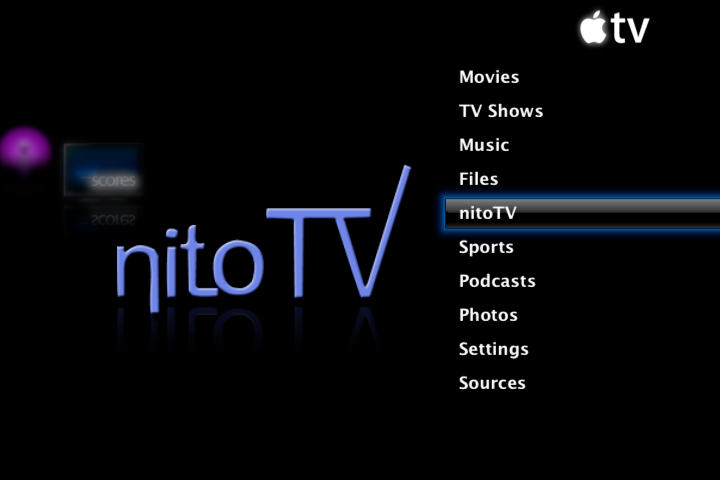
NitoTV leverages the AppleTV’s standard interface. Therefore, it is a great solution to be for anyone who is used to the native interface available on this device and wants to extend its capabilities. I won’t go into details about Apple’s Frontrow interface since it is so pervasive.

Some elements of the interface are not as clean as Boxee and XBMC. That said, the power of NitoTV is related to the wide range of stuff that it lets you do such as playing classic Nintendo and Sega games, view RSS feeds, and launch other applications. (In the interest of full disclosure, I have not set-up the games or launched any new applications from NitoTV yet).


[link to Nito blog]

How to Free Your AppleTV
Though it took me a long time to figure out how to do this, you should be able to do it in about 30 minutes. Before you get excited about trying this out I must caution you that there are risks involved in this procedure – do it at your own (or your AppleTV’s) risk. I strongly recommend that you back up all of your data. Another important consideration is that you should remove all USB drives from your computer while running to flash creator (I’ll tell you more below). Lastly, make sure you read ALL of the instructions below and the updated instructions on the developer’s website.

So if you are still interested, here is what you will need:
  • A USB thumb drive. Note that not all USB can boot an AppleTV so here is list of USB drives that are known to work. http://forum.boxee.tv/archive/index.php/t-1240.html
  • AppleTV software version 2.3 or earlier. If you have a newer version of AppleTV than this probably won’t work. As of today version 2.3 is the latest one.
  • Broadband internet connection to a network that serves your computer and the AppleTV.
Note that I have only learned how to create a patchstick on a Mac. However, if you run windows I suggest you check out the USB flash drive creator website download the Windows version and follow the instructions.

Step 1: download the USB flash drive creator for the Apple TV from this website. This application is by far the best solution that I found - download it here. Other patchstick solutions do exist. You can create your own patchstick using scripts from the awkwardTV website and some basic shell commands. Or you can choose to purchase an easy to follow patchstick solution from a website called patchstick.ca. I tried both of these approaches and neither one worked for me – not even the paid approach. If you know of other solution please leave a comment (I’m sure there are other ones out there).

Step 2: Install software on your Mac

Step 3: Plug USB flash drive into your Mac

Step 4: Launch application.


Step 5: Set installation and options
The first steps are easy: just select ATV-Patchstick from the installation list; then from the installation options menu select AppleTV version 2.x, and all tools and applications.

Step 6: Set USB target device This step requires great care. If you choose the wrong USB Target Device you can end up erasing all the contents from one of your USB disk drives. If you don’t know the drive number of your USB flash drive then you should use the Disc Utility application to confirm. Another tactic is to remove all other USB drives during installation.

Step 7: Plug USB flash drive into your AppleTV

Step 8: Install the software on your Apple TV
To install the software you need to reboot the apple TV by simultaneously pressing the menu and ‘-‘ buttons. When the AppleTV reboots a linux penguin will appear on the screen. Then notes delivered in terminal-style text will begin to appear. The text informs you when the installation is completed. At this point you need to remove the power chord from your AppleTV, leave it unplugged for 5 seconds, then connect it back up.

Step 9: Install Boxee and XBMC Once the AppleTV reboots and you arrive back at the main menu you will notice that there are a few new options available: “Launcher” and “Software Menu”. Select “Launcher” then “Downloads”. Before you are able to open Boxee or XBMC you need to download the applications via this page, even though they already seem to be available via the menu.

Step 10: Install NitoTV The process for installing NitoTV is a bit more complex because you need to use the terminal on your Mac. You can download the application from this page, then just follow the instructions on the read me file.

Sunday, January 18, 2009

Linking Physical and Digital Worlds with Microsoft Tag

The recently launched Microsoft Tag provides similar functionality to QRcodes and other 2D barcode technologies. Though this tag does not offer new functionality, it has been optimize for use by cellphones: it is works well with fixed-focus cameras, standard issue on most mobile phones; and it can be read more effectively when the image is blurry, or the tag damaged. The image on the left is a Microsoft Tag that links to this blog.

To use the service the process is akin to that used for QRcodes. First users need to install a reader application on their mobile device. This application is available on many platforms including iPhone, Windows, Java, etc. Once installed, users run the application and "simply snap a picture of a tag using the camera on their internet-enabled phone and they are taken to a page that shares additional information on the associated product or service without the extra step of entering complicated web addresses or texting special codes."

For the moment anyone can generate a tag for free via the Microsoft Tag website - all you need is the URL to which the tag will be linked. However, this product is still beta and Microsoft has not announced whether it will at some point start charging for the service. Now that mobile applications have become mainstream I hope to see more widespread adoption of reader technology by mobile phone users and the increase in application of this type of technology for all types of communication.

[sourced from PSFK article]

Saturday, January 17, 2009

Vodafone: Mobile Devices for Emerging Markets

Over the weekend I discovered an online magazine called Vodafone Receiver. This publication recently released an issue focused on emerging markets that features several interesting perspectives about design and innovation.

Similar to Nokia, Vodafone positions emerging markets as places that offer business opportunities for local and global companies; that have large numbers of people with an entrepreneurial spirit; and where companies can make a positive impact on the development of local communities. The article Poor Markets Make Good Cents lays out this perspective with some interesting supporting evidence.

Phones, Finance and Innovation

First and foremost, during the past couple of years mobile phone adoption rates have skyrocketed in emerging markets throughout Asia, Africa and Latin America. A large demand for mobile technology exists in emerging markets. In many of these countries the landline infrastructure was never adequate to support poor communities. Therefore, this is the first time that many people have had the opportunity to own a phone of any type. The same goes for the computing functionality. A mobile phone tends to be the first information device that these people have experienced since computers are out of reach due to their much higher price tags.

On the supply side two important trends are driving the financing of information and communication technologies in emerging markets. First, the appearance of new institutions dedicated to linking financial markets to social entrepreneurs and ventures that use market forces to drive social change. Secondly, the fact that traditional venture capitalists, who had previously written off these markets, are taking a fresh look at them. These trends help create opportunities for local and foreign entrepreneurs to promote innovations that make a positive impact on local markets.

This article also features interesting examples of mobile services that are positively impacting communities in emerging markets. These examples highlight successful services that were developed to address the specific needs and context of emerging market residents.
  • In 2007, Reuters launched a service called Market Light that provides weather and market information to farmers in India. This information enables farmers to better tend to their crops and to negotiate the fair prices with middlemen.
  • In Bangladesh, a service called CellBazar provides an SMS-based craigslist of sorts. It includes listings for appliances, cars, apartments and even live animals. This service, a spin-off of MIT's Program in Developmental Entrepreneurship, is helping facilitate commerce for individuals and business, and providing both buyers and sellers with access to a much larger marketplace.

The second article of note from this issue of Receiver Magazine is titled Mobile Communication in the Developing World – A Design Challenge. It focuses on human factor insights to help designers create appropriate mobile devices for emerging markets.

Design of Mobile Communications

Development of mobile devices and services has always been, and continues to be, driven primarily by the needs of customers from advanced countries. “Mobile interface design has been aimed at literate, numerate users who follow text-based menus, sometimes read instruction books and have built mental models for how mobiles work based on previous technologies.”

People in emerging markets have significantly different needs, education background and social-cultural perspectives. Most existing mobile interfaces are not appropriate for these markets because they don’t adequately support users who have problems reading and writing, and many native languages. Mobile phones tend to feature functionality that is not relevant for these markets and lacks applications that support specific local needs. So let’s take a look at some important considerations for designing mobile products for the developing world.

The literacy rate is the an important design consideration that is specific to emerging markets. “There are 799 million illiterate people in the world.” Low literacy users are able to make and receive calls but are not able to read text-based menus or take advantage of text-based communication and organization tools. Features such as phone books and asynchronous messaging need to be redesigned for this population. Recently a carrier in India launched a low-cost mobile phone with a voice-based interface and no screen. Called Spice, this device also features a Braille keypad for blind users.

Gaining a deep understanding of social and cultural dynamics is the next important consideration. It is crucial for designers to be able to envision and create relevant products and services. The two services mentioned earlier, and phone banking services are examples of products that were designed with an understanding of local communities and context. They address relevant needs and leverage technologies and interfaces that that are appropriate.

Support for native languages is another consideration that is important, especially in Asia and Africa. Even literate users are unable to read menus written in a language they don’t know how to speak. Therefore, in order for mobile devices to reach their potential handset makers will need to consider development of devices with design hardware and software design features to support additional native languages.

The last, and most obvious, consideration that needs to be kept top-of-mind throughout the design and development process is affordability.

Friday, January 16, 2009

Nokia: Mobile Products for Emerging Markets

During my exploration of design for emerging markets I came across many articles associated to Nokia. These pieces were either written by researchers who had worked for Nokia, or written about projects supported by Nokia. It is obvious that Nokia is one of the technology companies that is most committed to developing solutions for the emerging market. Of course this is not an altruistic-only strategy as great riches await companies that can design products and services that profitably expand the reach of technology to poor communities.

Here is an overview of several interesting and innovative initiatives from Nokia that are related to the design of products and services for emerging market users, and supporting the spread of mobile technology in developing areas.

Nokia Life Tools

“Life Tools” is the first initiative from Nokia that piqued my interest. I learned about it through a post on PSFK in early November. This suite of tools will provide emerging market phone users with access to agriculture and education-related services, helping to connect and ‘empower’ them. Entertainment services will also be available. Soon, many basic Nokia handsets will come with these capabilities pre-loaded, assuming you live in a market where these services are supported. [view an overview about these services from the Nokia website]

This suite of services was designed on an SMS platform to overcome the technological challenges present in rural areas such as the absence of access to the mobile web. This is crucial considering that data services are not available in many of these areas. This solution also enables users to avoid the complexity and high-costs associated to billing of data based services.

It is interesting to see Nokia entering more fully into the services space with this new offering. This is a direction that we have seen some companies pursue on the high-end of the market. For example Apple with its extensive suite of services has for a long time stood for empowerment and freedom. It is interesting to see Nokia leveraging a similar strategy of empowerment that is appropriate for people from the opposite end of the economic continuum. The center of their digital universe is a cell phone rather than a MacBook, iPhone or Blackberry.

According to Ken Banks this initiative from Nokia is “a move that mirrors the company's "developed world" strategy -- a move from out-and-out hardware supplier to one of a more inclusive services-based outfit. As if (very) successfully designing and building low-cost handsets for emerging markets wasn't enough, Nokia will now start offering emerging-market specific data services through its low-cost phones.” [read the full article here]


Nokia Siemens Networks Village Connection

The Networks Village Connection is another interesting and innovative product from Nokia that is designed for emerging markets. This technology was developed to enable mobile networks to extend into rural areas beyond the reach of conventional networks. It uses modular and compact GSM Access Points that can be owned and managed by a local entrepreneur or by an existing mobile provider. [read more about this technology on the Nokia website]

Expanding Horizons
Nokia even publishes a magazine related to opportunities associated to consumer telecommunications in emerging markets, this magazine is called Expanding Horizons. Here is an overview about this magazine from its own site: "Expanding Horizons is a quarterly publication aimed at ICT decision-makers in the private and public sectors. It explores the socio-economic benefits that mobile technology offers as well as best practices from around the world in order to encourage affordable mobile communications and bring Internet to the next billion consumers. It also shows how to create a favorable environment for market growth." [read it online here]

More than anything this magazine demonstrates that Nokia’s focus on emerging markets is driven by business considerations. This is expected and I don’t think it is a bad thing. Nokia is helping to increase the reach of communication technology to a whole new group of people who were previously ignored due to profitability considerations. If they continue to design services that empower people, like Life Tools, then this relationship should benefit both parties: Nokia and other telecom companies, and more importantly, people from emerging markets.

The February issue from this custom publication features an interesting article about bringing the internet to the next billion users. This article demonstrates that Nokia has a solid understanding of business opportunities, economic challenges and social and cultural nuances that impact the design and adoption of technology in emerging markets. [read full article]

In this article they highlight two important aspects distinctions in the way that the internet will be adopted by the next billion people. These differences focus are related to “how” and “why” technology is adopted; both factors that have a large impact on design of appropriate services:
  • Internet adoption will be driven via the mobile handset, as opposed to the desktop or laptop computer. “The sheer cost-effectiveness and convenience of mobile technologies will prove decisive. Mobile devices are pervasive, with penetration growing at a rapid pace.”
  • The specific needs of people in emerging market will drive creation of new services, not available in advanced markets. “The internet for the next billion consumers will be very different to the services prevalent in advanced markets… The mass of consumers in emerging markets lives in semi-urban and rural areas. Villages are far apart. A trip to the city is a big event in many people’s lives. We need to understand that their context is highly local.”
Closing the Digital Divide
Ken Banks brought up an interesting dilemma related to these prophesies of internet adoption in emerging markets from Nokia and other handset makers. Ken questions the way these companies talk about the mobile phone helping close the digital divide. He points out that mobile phones are relatively cheap devices, provide instant voice communications and SMS functionality, and offer the potential to provide access to the internet. However, many of these functionalities are not available in the handsets available to low-income users in emerging markets. Internet specifically tends to not be accessible on the low-cost phones sold in developing nations.

This issue is caused by the fact that “many people make a huge assumption about the technologies available to users in developing countries.” According to Ken “if we’re serious about using mobile to help close the digital divide, how about diverting international development funding towards providing a subsidised, fully-internet ready handset for developing markets?” Interesting question indeed. [read his full article here]

Wednesday, January 14, 2009

Creating Apps for Apple TV

This past weekend a good friend, who is a fellow Apple junkie, told me about how to get Netflix and Hulu on my Apple TV using an application called boxee.tv. I was on the fence about installing this application because of the complex installation process that involves a patchstick, and the additional time and expertise required to use and maintain a hacked device. During my research about Boxee I found a wiki called AwkwardTV that is a resource for a community of developers who develop applications to run on the Apple TV.

Here is a brief excerpt from this website:
"Out of the box, it [Apple TV] is enabled to stream digital content from any computer running iTunes. As there is little information provided about what is going on "under the hood" of the Apple TV, this is a place to collect and share information... This website is dedicated to finding additional uses for the Apple TV by (legitimately) enabling its Potential Capabilities, and is a place for the community to share ideas, discoveries and solutions."

One of the most interesting things I discovered on this site was a list of potential capabilities of the AppleTV. This list includes a lot of pretty cool functionality. However, most of this functionality is not yet leveraged by any existing applications. Considering that the Apple TV is a computer, Apple could choose to release an SDK and make an even wider range of capabilities available to developers (the awkwardTV community specifically calls for this to happen). Here are some highlights from the full list of potential capabilities of the Apple TV:
  • Stream and sync additional video and audio formats
  • Increase internal storage and connect external storage
  • Connect a TV tuner for recording and use as a DVR
  • Connect DVD and HD-DVD drive for playback of music and video
  • Play games using arcade and console emulators
  • Convert the Apple TV into a player for Netflix, Hulu, and other video sites
  • Work as an In Car Entertainment(ICE)/Carputer/CarPC unit
  • Run Linux, Webserver Apache, and USB print server
All of this leads me to starting thinking about whether an application store will soon be launched on the Apple TV. The more I think about it more, the more probable it seems. Apple is already selling audio and video content directly via the Apple TV so the infrastructure already exists. Also, the current success of the iPhone app is likely to strengthen the business case for offering users the opportunity to customize the functionality on their own devices. All that said, no SDK has been released for the AppleTV so it will take a while for an App store to be born and Apple is likely concerned about cannibalizing their iTunes revenue stream.

I'm getting off track here. The real point of this post is to consider the interaction design opportunities offered by transforming the Apple TV into a platform. So here is a short list of product and service ideas generated using a 5 minute brainstorm:
  • Enable users to receive updates from their calendar, and notifications from messaging applications via the Apple TV.
  • Create video games and other applications that integrates the iPhone as a control device.
  • Develop applications with social capabilities for people to enjoy content while holding conversations with friends that are viewing the same content remotely via web or another Apple TV.
  • Develop applications to enable users to control relevant digital appliances throughout the house using an on-screen interface (turn on coffee maker, the stereo or get the water going for your bath).
  • Enable wider adoption of video conferencing by creating easier to use software in a more appropriate context. Functionality improvements can include simple on-screen menus that are easy to use and support of using the iPhone to control application. A large screen TV in a living room with a couch can be an ideal context for this device in a family home as the whole family can participate in the conference simultaneously.
  • Support touch-based interfaces using touch screen adapters such as the interactive foil from Visual Planet that I featured in a post a few months back [check it out in action here].
An interesting aspect about this evolution of the Apple TV, is that it is part of a broader trend: the migration of data services to TVs using various types of devices - video game consoles, computers and "task-specific" devices such as the iPhone. This is an area where an interaction paradigm has not been established as firmly as on the desktop, which means that it is an area that is ripe for innovation.

Saturday, January 10, 2009

Design and Adoption of Technology for Emerging Markets

For the past few months I have been thinking about the design and adoption of technologies by people in emerging markets and other under-served communities (a.k.a. Base of Pyramid, "BoP", markets). During this period I've come across several interesting ideas related to this topic. It is clear that many challenges and possibilities have been, and are being, created by technology's continued expansion into the lives of people who just a few years ago were "off the radar".

My interest lies in exploring the common features shared by products and services that have been successful in these markets, and understanding how the process of design can evolve to support innovation focused on creating products and services that are appropriate for these communities.

Perspectives from Emerging Markets
People in emerging markets have particular worldviews that are colored by the specific context in which they live. I am implying not only that numerous differences exist between developed and emerging markets, but also that an equal number of differences can be found between emerging markets alone.

Here I will focus primarily on key characteristics that differentiate most emerging markets from developed ones. First and foremost, consumers from emerging markets tend to be less confident when it comes to making purchases due to their tighter economic situation. According recent article from Interactions magazine written by a team from Human Factors International, consumers in these markets "are more cautious than their counterparts in the West; they would rather pay more for quality than risk product failure". Affordability is important to them but they are not willing to accept products that offer low-quality compromises as "every act of discretionary consumption is an act of sacrificing something essential." [read full article]

On Core77, interesting insights are offered by Niti Bhan about the behavior of people from low-income communities in emerging markets. "Buying behavior and decision-making criteria imply that those in the lower income strata—particularly in the developing world—are not 'consumers' but in fact extremely careful 'money managers' for whom an expense is often an investment whose return must be maximized... The BoP customer has not been bombarded by mainstream consumer culture and all the trappings of 'consumerism' that come with it." [read full article]

This is not to say that the choices of these consumers are not influenced by emotion - emotion plays an important part in determining the "return" that will be delivered from a given purchase. However, the role of emotion is somewhat tempered by the fact that most of their spending choices are focused primarily on meeting basic human needs such as clothing, food, shelter.

When approaching emerging markets most companies take the approach that the same basic value proposition can serve across all markets since people have the same basic needs. Pricing and cosmetics are often considered the only elements that truly need to change. This approach demonstrates a lack of understanding regarding the extent to which the needs of these audiences differ from more affluent markets. Santosh Desai sums up the point nicely: "the need is to develop products that are appropriate rather than merely cheap."

Adoption of Products and Services in Emerging Markets
There are many factors that influence a product's rate of adoption. According to the article from Interaction magazine, these factors include "infrastructure, culture, language and dialect, purchasing power, literacy, urbanism, and terain." Recently on PSFK Allison Mooney shared her perspective about the three fundamental forces that govern the adoption of new services and products. Though her post focused exclusively on the adoption of a clunky service in South East Asian emerging markets, these hold true for all markets. So here are the three fundamentals [read full article on PSFK]:
  1. "Discovery: Is there an easy and reliable way for people to learn about it?" (Does their community use it? Can their teenager or friend explain it them? Is it something that people will feel comfortable sharing? If a device is required, is such a device common and easy to acquire and use?)
  2. "Utility: Does it enable them to do something they need or want to do?" (Does it fulfill a real need or is it useful? The need can be practical, e.g. banking, entertainment, e.g. games, or something else - but it must offer some utility.)
  3. "Motivation: How badly do they need or want to do this?" (How does the utility offered by this product compare to difficult required to learn how to use it, or the costs associated to its use - monetary, cultural and social costs? For hard to use or expensive products and services a lot of motivation is needed.)
To examine the value of this framework let's do a high-level analysis of successful products and services from emerging markets. First let's examine mobile-enabled financial services that have quickly gained adoption. In many developing markets, mobile phones have emerged as the communication standard because in large part due to the scarcity and expense of land lines. However. the role that these devices play has expanded far beyond calling; in the Phillipines and India they have evolved into important financial instruments and are often referred to as "wallet phones".

In these countries banks and phone companies have begun to support a wide range of phone-based financial transactions in ways not commonly available in the West. Services offered include checking balances, money transfers and even e-cash capabilities. According to the previously mentioned article from Interactions magazine, a "currency-free future is dawning in these 'developing countries... mobile phone providers like the Philippines' Globe Telecom have become a kind of shadow banking system."

In Mumbai, a start-up called Eko partnered with a local bank to offer these same types of services. Users carry out transactions using USSD messages that feature a complicated syntax consisting of long sequences of numbers, *'s and #'s (thanks to Anupam Varghese for pointing out that this service is provided using USSD as opposed to SMS). USSD enables a transaction to be just 'dialed' as if it were just a longish phone number. Here is an example of a transfer request for 100 rupees: "*543*190123456789*100*1133740274#" (I suspect the service from the Philippines has a similar interface). Despite the seeming "clunkiness" of the user interaciton these services have achieved wide adoption.

So how does it line up against the fundamentals we laid out above? To drive discovery of these services, the bank in Mumbai set-up a network of neighborhood service representatives that promote the service, and sign up and assist customers. The telecom company from Philippines is able to drive discovery via marketing and their existing network of representatives. From a utility perspective boths services are obviously useful, enabling mobile phone users to easily access money. Though the interface seems "clunky" it is easy to use because it leverages a known behavior (dialing numbers), a widely used feature (SMS) of a commonly available technology (cell phones). In Mumbai, neighborhood service reps also provide support so that it’s not necessary for people to know how to do everything themselves.

Design of Products and Services in Emerging Markets
I believe that good design delivers some form of usability, coupled with a pleasurable and meaningful experience. This perspective is based on the consumerist cultural and social context in which I live, my privileged economic situation, and my passion for design and aesthetics. In order to create products that are appropriate for emerging markets designers need be aware of cultural and social blind spots. Understanding the specific cultural, economic and social context is key to designing a successful product. Ken Banks of kiwanja.net recently wrote about what causes many products to fail: "lack of basic reality-checking and a tendency to make major assumptions are lead culprits, yet they are relatively easy to avoid."

The latest issue of Interaction magazine featured a study into the adoption of a mobile service. This piece highlights the importance of leveraging deep cultural and social understandings when designing services. The focus of this study was a project to leverage mobile phones to enhance education for school-age kids. In order to create a solution that was adopted by students the design and research team had to go through several prototypes. During this process they unearthed important social and cultural behaviors and beliefs that guided updates in the design of the user interactions and the way in which the education was developed and delivered. [read full article]

Niti Bhal outlined a human-centered framework for the creation of successful products and businesses for BoP markets. This framework, called 5-D, is comprised of 5 elements: development, design, distribution, demand, dignity. The first four elements roughly align to phases of a process, whereas the final element refers to the philosophy of the approach. Below is a brief outline of these 5 elements. [read the original post]

Development refers to the identification of opportunities for social or economic development that will serve as the basis for the design. Design refers to the creation of a product or service in response to the opportunity for development. Distribution refers to need for ability to make a product or service readily available for customers. Demand refers to the development of an appropriate value proposition that can communicate the benefits of your product or service. Lastly, Dignity refers to the need to create products and services that respect economic, social and cultural needs and with an intent to create a positive impact.

Saturday, December 27, 2008

Book Summary: Making Meaning – How Successful Businesses Deliver Meaningful Experiences

Summary of book written By Steve Diller, Nathan Shedroff, Darrel Rhea

This book has valuable ideas regarding how to drive innovation in today’s experience economy. It was written by a group of experts from the field of experience design who have strong ties to Cheskin, a strategic design consulting and market research firm with a focus on helping companies to develop meaningful innovations. The concepts and framework presented here reflect the thinking and approach that were developed, and are currently used, at this leading design research firm.

Many of these ideas have been communicated via blogs and articles published over the past couple of years. The value of the book, in comparison to the content that you will find online and in magazines, is that it has enabled the authors to explore these ideas in greater depth. Here they are able to provide additional background and contextual information in defense of their perspectives, as well as a more in-depth description of the frameworks and methodologies they have developed to help their companies and clients succeed. At only 140 pages, this book is a fast and enjoyable read that is clear and easy to follow.

The guiding premise for this book is that “consumers increasingly make their purchasing decisions based on deeply valued meanings that companies evoke for them through their products and services… as opposed to simply responding based on features, price, brand identity, and emotional pitches.” In other words, we have entered an era of meaningful consumption. This new world is framed by the rise of globalization, the end of the mass market, and the empowerment of individuals. To succeed organizations can no longer innovate for the sake of novelty, they must focus their innovations on addressing the human need for meaning.

Once this initial premise is laid out, the authors shift their focus to mapping out the evolution of consumer demand in Western society. Next they define the concepts of experience and meaning, to provide a foundation for the second half of the book where they focus on the creation of meaningful experiences. During this section they explore how to find opportunities for meaning, and how to design and deliver meaningful experiences. Below I’ve included a more in-depth overview each of these sections.

Brief Evolution of Consumer Demand

From 1900 through the middle of the century most innovation was product-based, focused on price and feature improvements. With the rise of the assembly line and growth of distribution infrastructure, companies were able to produce products with new features (e.g. soap varieties, car colors, etc.) A “build it and they will come mentality” ruled the day.

In 1950 a brand-focused approach to innovation began to take hold. This shift in perspective became more prevalent as companies realized that serving a single market segment with specific needs and desires was a strategy for uccess. In this period the driving force of innovation evolved from product “features” to “benefits”, which can be physical, emotional, identity-focused or social.

More recently, as the branding has evolved to encompass all customer touch points, the focus of innovation has shifted to the creation of experiences. This brings us back to the premise of this book: to succeed in this market, organizations must base their innovations on delivering “meaning” rather than “benefits”.

Definition of Experience and Meaning

At the most basic level experience can be defined as a “sensation of change.” However, from a business and design perspective, “experience” refers to engagements that are created by consistent and coordinated systems of interactions, or “touch points’, that are designed to convey a specific brand characteristics or attributes.

The focus on creation of experiences “reflects a company’s effort to be consistent in its value proposition and its expression in every connection with a consumer.” That said, consistency is not sufficient to make an experience relevant, compelling, and valuable. Experiences must deliver meaning.

The definition of meaning used in this book refers to “connotation, worth, or import”. Here is a personal example: “going to music concerts is meaningful to me because it gives me a sense of beauty.” From this quote you can tell that I appreciate concerts because they inspire me by delivering pleasures to my senses.

Meaning is central to our experience of reality. It is created on a personal- and community-level and serves as the foundation for our understanding and actions. Going back to experiences, they enable companies to “evoke” meaning since they are not able to actually create meaning, which only arises in their customers’ minds.

Fifteen different “meanings” have been identified as being the most universally valued according to the fieldwork carried out by the authors. Here they are in alphabetical order: Accomplishment; Beauty; Creation; Community; Duty; Enlightenment; Freedom; Harmony; Justice; Oneness; Redemption; Security; Truth; Validation; Wonder.

The Starting Point

To deliver meaning, companies need to reverse their development process to start with an understanding of their customers, and what their customers’ find meaningful. The first steps on this path are for an organization to identify their innovation culture, and put together a team to drive change.

A company’s innovation culture ultimately drives its innovation process and rate of change. There are three different types of cultures explored in this book: Structured, Creative, and Dynamic.

Regardless of culture, companies need to leverage interdisciplinary teams to successfully create experiences that are meaningful “because [this] heightens the likelihood that all customer touch points of the experience will be cohesive and consistent.” Here is a list of the core participants that should be involved in innovation initiatives: Brand Management; Sales Management; Marketing Management and Research; Design; Development/Production; Information Technology; Human Resources; Operations; and CEOs. As with any team, a lead decision maker needs to be identified from one of these areas of expertise.

Design Principles and Process

To deliver meaningful experiences, companies need expand the role of design from viewing it as a function that is limited to visual representation and adornments to embracing it conceptually as a process across all disciplines.

The conceptual role design should play to drive the development of meaningful experiences should be driven by seven principles:
  1. Design creates corporate value
  2. Design is pervasive
  3. Design is collaborative
  4. Design includes execution
  5. Design is a transparent, knowable process
  6. Design is iterative
  7. Design includes both short-term and long-term goals.
These design principles reflect a philosophy that views design as a process that can be broken down into five distinct phases:
  1. Identifying the Opportunity for Meaning
  2. Framing the Experience
  3. Shaping the Concept
  4. Refining the Experience
  5. Expressing the Experience

The Process in More Detail

1) Identifying the Opportunity for Meaning: during this phase companies learn about the competitive landscape, market size, important trends and technologies, distribution channels, and customer lifestyles, preferences and needs. Key activities include defining the market and understanding the customer. Various types of primary and secondary research are needed to unearth these insights.

2) Framing the Experience: during this phase companies choose the audience segment on which to focus, identify the experiences they will create, and define the meaning the experience should deliver to customers (e.g. the scope of the experience) including articulating the value form functional, economic, emotional and identity perspectives. Key activities include choosing the experience and creating an experience framework to define the scope of the experience.

3) Shaping the Concept: during this phase companies think through all necessary elements that will enable them to deliver a consistent and meaningful experience and avoid the most common pitfalls, which include errors of omission and conflicts of interest. Key activities include defining the breadth of expression, duration of experience, and intensity of experience.
  • From a breadth perspective, companies need to identify which components to leverage (most common components include product, service, brand, channel, promotion, marketing communications, customer support, and alliances)
  • Companies then need to think through how these various components will be integrated during the various phases of the experience to deliver meaning: initiation, immersion, conclusion and continuation.
  • Next companies need to identify the intensity of the connection a consumer will have with the experience. There are three separate levels of intensity, from weakest to strongest, reflexive, habitual and engagement.
4) Refining the Experience: during this phase companies fine-tune the experience being created by customizing characteristics of interactivity such as user control, adaptability, feedback and communication; and by designing the triggers of the experience including language, symbols, and sensations. Key activities include exploration of interactivity and definition of aesthetic details.

5) Expressing the experience: during this final phase of the design process companies produce and deliver the experience. Unlike the linear processes associated to assembly-line businesses, experience-based companies are in a perpetual state of production and need to maintain the appropriate mindset to support this reality.

Relevant Links
Here are links to the websites and blogs from the authors from this book. I specifically want to highlight Nathan's website because it has a wealth of resources related to interaction and experience design including lists of books, articles, blogs and courses. I have used these resources extensively in developing my personal curriculum.

Wednesday, December 24, 2008

The Design of Interaction with Music for Video Games

Since the launch of the original Guitar Hero game in 2005, music-based video games have quickly grown in popularity. Recently, music has overtaken sports as the second most popular category for video games. Equally astonishing, according to the Venture Beat blog, these games are now driving adoption of video game consoles more than any other genre.

The sudden growth in popularity of these games has been driven by the evolution of the design of game interactions beyond the traditional game controller. Guitar Hero provided the first interaction breakthrough when they released a controller that is designed to mimic the feel of real guitar. These controllers have been much improved since the first Guitar Hero release. My personal favorite is the Rock Band guitar because it provides the most natural feel and is considerably more accurate from a strumming perspective.

When Rock Band launched in 2007 it also helped push the envelope by supporting four person games and adding interactions via drums and a microphone. Now gamers can create an virtual "rock band", as opposed to being limited to guitars only. For people like me, who always wanted to learn the drums rather than guitar, this was an awesome new feature.

That is not to say that Rock Band is the clear leaders in the market, the battle rages on Guitar Hero. Earlier this year Guitar Hero came out with a new version that not only features a full band set-up but also enables players to compose their own songs that can be shared with others online. For the first time gamers are able to go beyond playing existing songs to create their own masterpieces.

Since the launch of the newest Guitar Hero game, Nintendo has released a music creation platform of its own. The Wii Music game enables players to interact with over 60 virtual instruments. This release, which was launched approximately two months ago, is often referred to as a toy rather than game. The reason being, it is focused on enabling users to play with virtual instruments for pure pleasure and does not feature structured and score-based goals as is common on both Guitar Hero and Rock Band.

The growing popularity of music-based games has also reached mobile platforms such as the Nintendo DS and the iPhone. For the DS platform, two games are currently available: Guitar Hero and Ultimate Band. Both attempt to leverage similar game-play experience to the console games listed above - of course, in a much simplified manner to work on this portable device. The music-based game offerings for the iPhone are quite similar. They include a series of Tap Tap games (which are some of the most popular apps in the app store) and Guitar Rock Tour.

One more interesting thing to point out is the impact that these games are having on the music industry as a whole. According to MSNBC and AP "Aerosmith [has] made more money off the June release of 'Guitar Hero: Aerosmith' than either of its last two albums, according to Kai Huang, co-founder of RedOctane, which first developed 'Guitar Hero... [and] Artists from Nirvana to the Red Hot Chili Peppers have seen sales of their music more than double after being released on the games... The Killers released two new songs on "Guitar Hero" the same time their latest album came out."

Here are some interesting articles about music games that served assource materials for this post:

Best of 2008: Yanko Design's Top 50 Pick

Since I started my design curriculum I have been following the Yanko design blog. This resource has proven to be a consistent source of fresh and innovative design concepts. Their focus is primarily on industrial design, rather than interaction design. That said, since most of the product ideas they feature are technology-based, the concepts often do address interaction design (though not at the level of depth that I would like them to be explored - but this is my problem not theirs).

Without further ado let me get to the point - today I came across their list of top 50 design concepts from 2008. This post includes all of the coolest products that they've mentioned on their blog throughout the year - ranging from simple bookmarks, curtains and clothing to advanced new portable phones and wearable computing devices. Here is a short list of some of my favorites in no particular order (with links to the original posts):
[via Yanko Design]

Saturday, December 13, 2008

The Design of Interactions with Music - Portable Devices

Continuing on the topic of designing interactions with music, here are a some examples of lo-tech hacks and and innovative new designs that enable people to interact with music in cool ways. The consistent thread that runs through all of these examples is that these instruments are all portable but are not mobile devices, such as cell phones and mobile gaming units.

The "Ghetto" Talkbox
In my recent post regarding music interactions on mobile devices I shared an example of a Nintendo DS Lite that had been hacked into a talkbox. Here is a lo-tech way to create a talkbox, taught by Moot BooXLe. Before watching this video I had not clue how musicians play with a talkbox. It's pretty interesting: the talk box has a long tube that is placed in the musicians mouth, it is also hooked up to another instrument (usually a keyboard). Therefore, the musician modulates the music that is played from the instruments by talking or blowing air into the tube.

All you need to create your own "ghetto" talkbox is a plastic tube, a PVC end cap, a cheap powered speaker, a box, and some duct tape. Add to this one to two hours of labor and you've got yourself a talk box. It's pretty cool how you interact with the talk box.


Lo-Tech Drums
I know that this is an extremely lo-tech solution; it is by far the most lo-tech feature on this post. All that said, I think it is worth sharing because, though it uses no electronic components, it is a well designed little system. Notice how even though the drummer only interacts directly with the books while the sounds are created as a result of the interaction between the books and the other objects placed on top of the books as well.


Beat Blocks
This is the first electronic music interface from the bunch. Beat blocks is a physical computing interface that enables users to control four different 4/4 loops. Each loop contains a drum track that can be modified on-the-fly by placing or removing blocks of wood into one of 16 different slots that are arranged in a 4/4 formation on a square plank of wood. There are several different types of block. Each block features from 1 to 4 stripes; each stripe denotes the existence and timing of a beat. The pattern of each loop is determined by the presence of these blocks on the 4 consecutive slots that make up that loop.

What I like about this interface is the way it integrates virtual attributes into physical objects. However, this system has limited capabilities and my interest in it is more related to its experimental nature. Most interfaces that use today to interact with music software on computers is derived from physical equipment (guitar, mixers, etc). That is not to say that a different interaction paradigm that is enabled by technology cannot be created. Hence the importance of experimenting beyond our accepted modes of interactions.


Beat Bearing Demo
This interface offers a similar mode of interaction to the beat blocks via a prototype that has a considerably better finished and some improvements. This tool supports interaction based on a physical computing interface that enables users to control four different 8 beat loops. Each loop contains a drum track that can be modified on-the-fly by placing or removing metal bearings into one of 32 slots that are arranged in a 4/8 formation on a rectangular plastic casing. Each row of 8 slots represents one 8-beat loop, while each slot on this casing represents a single beat.

The one-to-one relationship between bearing/slot/beat makes this interface easier to understand and use than beat blocks. It also provides the user with greater freedom to manipulate sounds. The one area where the beat blocks outperforms beat bearing is in regards to the length of the loop itself - beat blocks supports four 16-beat loops, as opposed to four 8-beat loops. Similar to beat blocks, the beat bearing interface is a mere prototype that is not commercially available (unlike the Tenori ON, which I will discuss next).


Tenori-on
The Tenori-on is a unique electronic music instrument designed by Toshio Iwai and Yu Nishibori. This device was originally created in 2005 but it was only released in 2007 after Toshio Iwai held live performances in clubs in several European cities. In his own words, here is the inspiration behind this creation:

"In days gone by, a musical instrument had to have a beauty, of shape as well as of sound, and had to fit the player almost organically. [...] Modern electronic instruments don't have this inevitable relationship between the shape, the sound, and the player. What I have done is to try to bring back these [...] elements and build them in to a true musical instrument for the digital age." [taken from wikipedia]

It is a pretty powerful tool, check out the video below of a Hot Chip cover performed with a Tenori-on. This device is consists of a screen that features a 16x16 grid of LED switches. Each switch is multi-purpose and can be activated in various ways to create music. The device also has a frame that contains a small LED monitor, two built-in speakers located and a dial and buttons that control other functionality such as the type of sound and beats per minute produced.


Drum Buddy Demo
The Drum Buddy is an analog-chic electronic instrument that, unlike the three previous examples, is obviously not a digital device. This instrument was invented by an eccentric artist from New Orleans named Quintron. The Drum Buddy has an innovative design that is described as a light-activated oscillating drum machine.

Here is my attempt at describing how it works: light, which is emitted by a light bulb mounted on the device, is captured by photo-sensors that activate oscillators, which generate sounds. These oscillators can be turned on and off, and controlled via switches. They can also be modulated by controlling the presence and amount of light. Check out the video below to see it in action, or check out the wikipedia entry.

This instrument is for true musicians (or very wealthy music lovers). There are extremely few of these in existence though they are still being produced in small batches. They occasionally go on sale on ebay with a $5000 starting bid. During my investigation about this instrument I came across an interesting quote from Quintron about why he created this analog electronic instrument:

"I believe that the digital revolution has cut short the development of new analog electronic instruments - this is a mistake. Analog instruments are presently regarded as charming primitive antiques. Though the DRUM BUDDY and its older analog siblings can create far fewer "types" of sounds than a contemporary digital sampling keyboard, if you analyzed the waveforms of both you would find the DRUM BUDDY sounds to be in a constant state of subtle fluctuation, whereas the digital sounds - since they are really composed of little uniform building blocks - will be rigid and unchanging unless some parameter on the instrument is changed. The analog sounds of the DRUM BUDDY, however, are constantly changing themselves - shimmering with a living complexity which even the 24 bit digital signal could never truly possess." [from Drum Budy site]

The Design of Interaction with Music for Mobile Devices

Lately a large number of music applications have become available for portable phones and mobile gaming system. A large number of music-related applications have been released for these devices - including software for music listening, playing, producing and sequencing. These offerings range from virtual pianos, guitars, drums, harmonicas, sequencers and many other instruments to innovative interfaces that allow inexperienced users (or professionals) to create music in new ways.

iPhone Music Applications

As would be expected, most of the music-related applications for the iPhone provide listening or informational functionality. There are some pretty interesting applications in these genres (Pandora and Shazam being two of my favorites), however, the focus of this post is on mobile applications that enable users to create music, both directly and indirectly. So here are a few of my favorites:

BeatMaker
This is an example of applications that mimics existing music instruments. This one provides access to a drum machine and a sequencer. It has a pretty cool interfaces that works well for the most part. They've done a good job at integrating the sequencer and drum machine on to this small touchscreen interface. This application provides a decent set of features, some highlights include ability to loop sounds, to record and playback tracks, and to add new sounds for the drums. The drum is really easy to use featuring large virtual drum pads (the sequencer is a little less user friendly).

Priced at almost $20, this application is definitely not for everyone. It is easy to use considering the the functionality it offers. However, it is more complex than more abstract applications such as Ocarina or Bloom. You do not need experience with drum sets or sequencers to play with beatmaker - I had pretty close to none.


Pro Remote
This is the most high-end example of music interaction application on the iPhone. One distinction about this application is that it does not create music, it is a remote control for Pro-Tools running on a Mac. Nonetheless, it is quite impressive. The video below only shows one small feature of this application. Check out this other video, which highlights some other interfaces provided by this application.


Smule Ocarina
This is an example of a simpler but in some ways more innovative music interface designed specifically for the iPhone. Ocarina is an application that turns your iPhone into an wind instrument whose output can be broadcast to a worldwide network of users. The instrument itself is pretty interesting. You create sound by blowing on to the microphone, and you control it by using four different virtual buttons on the touchscreen display. The application is simple, designed to allow inexperienced to quickly and easily make sounds. That said I quickly grew bored of it.

The networking feature is pretty cool. You can broadcast your music continuously on to the network (even when you are logged off). You can also listen to the broadcast of others via a pretty cool interface that shows the location where the broadcast originates and includes a visual representation of the music - some element of this visual representation can even be customized by the person who makes the song.


Bloom
This application provides another example of a simple and innovative interface designed specifically for the iPhone. Similar to Ocarina, this app was designed to be easy to learn and fun to use for people who are not musicians. Created by Brian Eno and Peter Chilvers, this music instrument enables users to produce melodies simply by touching different parts of the touchscreen. The melodies progress in a loop-like fashion and they slowly melt away and disappear after 30 seconds or so. The instrument will also start playing when left idle for over 40 seconds or so. You can choose from a nine different moods to change the sound of the harmonies. Personally, I prefer this app to Ocarina - though it also grew old pretty quickly.


RJDJ Album
Unlike the other applications featured on this list, this one is primarily used for music consumption rather than creation, which is not to say that it does not create music. The concept behind this RJDJ application is that it generates music on-the-fly using live sounds that are captured in real time mashed up with pre-recorded elements. The live sounds surface in the music as samples, and influence the progression of other elements in the song (if you can call it that).

Based on RJDJ's website they are promoting a musical genre called "reactive", where the sounds that people hear are produced that very moment by digital devices. This is definitely a genre in its infance (I had the music world that will see further development as more artists experience in this


Nintendo DS


KORG DS-10 (w/ optional Straw TalkBox)
The iPhone (and other cell phones) are not the only mobile devices that have more advanced and innovative music applications. A few months ago Nintendo released an emulator for Korg's DS-10 synthesizer. This application turns a Nintendo DS into a mini Korg DS-10. Check out this video - it is definitely more advanced than anything I've seen for the iPhone.

Since I don't own a Nintendo DS-2 - I only have an iPhone - I wonder when an app like this will come out on the iPhone? Is it just a question of time? to what extent does the low-average prices of iPhone apps inhibit the release of software of this complexity?


Another cool thing about Korg DS-10 app on the Nintendo DS is that a hacker in Japan has created a simple way to turn this device into a talkbox, using a simple straw. Check out the video below, just beware because it is in Japanese.


For Nintendo DS there are also a number of open source homebrew music applications - here is 24 examples courtesy of synthopia. Most of these applications are for more experienced users (unlike Ocarina and Bloom on the iPhone). Most of them are designed to provide advanced features and to run these apps users have to learn how to install homebrew software on their Nintendo DS. This requires a higher level technical know-how that tends to be limited to heavier user of the device.

[some content sourced via PSFK]

Thursday, December 11, 2008

Designing Interactions with Music


In late October I wrote a post about an article on Wired that noted how the iPhone, Wii and Guitar Hero helped bring to physical computing computing interfaces into the mainstream. My first prolonged experience with such an interface was through the DJ software Final Scratch that was release back in 2004. Through this experience I learned a lot about the meaning embodied through physical objects that support and guide our interactions with them. I also become present to the difficulties of trying to digitize your life (especially before there were millions of MP3 music sites online).

Sidenote: Music is one area where physical computing interafaces have been adopted earlier than in the mainstream. Over the next couple of weeks I will explore some interesting designs for interaction with music. However, now back to my own experience with digital DJing.

At the time that I started using Final Scratch I was a DJ who relied mostly on vinyl records, backed up by a small collection of CDs and an effects unit and sampler. I had reached the point where it was hard to organize of all my music, especially since my place was overflowing with records. I decided that digitizing my expansive electronic music collection was the best way to organize my music and make it findable; not to mention that this solution was going to address the space issue that would soon become exacerbated by the fact that I was moving in with my girlfriend, who is now my wife.

Final Scratch was designed to enable DJs to use vinyl records on any turntable to control the tempo and pitch of MP3 files playing from the computer, and it also supported the use of almost any 2 channel mixer as an output device. This hardware/software application enabled DJs to interact with music files on the computer by using the same physical instruments and gestures that they use when mixing vinyl records. Best of all it allowed DJs to carry a much larger amount of music and easily switch back and forth between tracks from the computer and vinyl records.

Though this type of interface does afford a lot of new possibilities to DJs, is also lacks some of the attributes embodied in vinyl DJing. First of all it took a few years before the reaction speed of the software was able to accurately mimic the feel of vinyl. Currently Serato Scratch Live is considered the market leader mainly due to their system's natural feel.

Next, the surface of records have natural, and sometime artificial, visible markers that serve as visual cues for DJs. Modern DJ applications have evolved to enable the DJ to add markers to visual displays of a track's soundwave to mimic this capability.

Lastly, the physical location of the record in your record bag/stack and the look and tactile feel of the cover had meaning that enabled you to easily locate tracks. It is harder to find tracks on a list where each entry lacks unique visual or tactile features. Now finding a record requires either text-based searches or a well thoughout playlist-based organization.

All pros and cons aside I decided to make the conversion. The next step in my grand plan was to digitize a large selection of records so that I could: (a) have the music available on FinalScratch on my computer; (b) sell the records on ebay to make sure that me and my wife could fit into our new 1-bedroom rental. It took me about a thousand hours over the span of a year and a quarter to digitize one thousand records. This experience helped me understand the amount of work it takes to convert analogue media into digital data (I can only imagine the costs of digitizing records for large older companies).

There were two main challenges that considerably lengthened the process. The first is caused by a physical feature of analogue media - it can only be recorded in real time. The second is due to the nature of digital media - music files are not searcheable, therefore, to make them easy to find you need to leverage metadata to properly categorize the files using some type of taxonomy (which, of course, I had to create on the fly).

Culture and Technology: Wifi Adoption in Brazil

While I was down in Brazil during Thanksgiving one of my friend accused me of having become too Americanized. This accusation was instigated by my expectation to find greater availability of Wifi connectivity in Sao Paulo. In my friend's defense, I am a freak about staying connected to the internet being accustomed to accessing the web via phone and wireless broadband card. In my hometown's defense, there are actually a growing number of restaurants and cafes that offer free Wifi (and this type of technology is still a lot more expensive down there).

One interesting characteristics of Wifi adoption in Brazil is how quickly the service industry has begun to leverage this technology. A large number of restaurants outfit their waiters with wireless PDAs to more efficiently capture orders and communicate those orders to the kitchen. They also use portable debit/credit card machines (similar to those seen at the Apple store) to enable guests to pay via debit card from their dinning table.

In my view these devices enhanced my experience, though I do understand that they are not appropriate for all dinning establishments. In New York I don't know of any restaurants that uses Wifi technology in this manner. Though I am sure there are a few, the adoption of this technology in this industry is extremelly limited in comparison to what I saw in Sao Paulo.

So how can we explain this different adoption trends? I posit that in Brazil technology is more closely associated with status and is viewed more widely as a positive sign of progress. This explains why the technology is used in a customer-facing manner, and why the restaurants where you find it are upscale and modern places. I attribute the lag in personal Wifi adoption to the current costs of the technology (which is still out of reach for most Brazilians).

In the US people have a more skeptical stance towards technology. This is especially in a food-related settings, which is echoed by the growing demand for organic and fresh offerings. Therefore, restaurants in the US are more reticent to adopt technology in such an "in-your-face". I assume that here in the US the use of technology in non-customer facing areas is equally, or more widely, adopted as in Brazil. On a individual-level, Americans had no sensitivity to adopting this technology for personal and professional purposes, quickly realizing the value it provides.

It is interesting to think about how these cultural differences impact the adoption and use of technology in different contexts, and the design of technology for these contexts.

Wednesday, December 10, 2008

Design Trends from Frog Design [Trendforum 2008]

Last week I came across a presentation from Frog Design about design trends. There were several ideas about the evolving nature of design that sparked my thinking (and considerable interest). First let me share with you highlights from the presentation first, then I will elaborate on my own thoughts.

Highlights from Frog Design Presentation
  • We are moving towards a design democracy: transition from mass consumption to mass customization. People are starting to take design into their own hands, enabled by technology. People are participating in the design of their own lives within a world that is "always on" for conversation and self-expression.
  • Designers beware of becoming an enemy of design: A shift in design mindset is happening from designing "for" to designing "with" people. This, of course, requires increased focus on understanding the people who will use the product. It also points to the opportunity for designers to focus on the creation of tools rather than final products - tools then enable users to make their own creation.
  • The system is the product. People are buying what the system means to them - e.g. what it enables them to accomplish - rather than the products/tools themselves. The system to which I refer here is comprised by the actual products that function as tools - Think iPod and lego.

Thoughts Sparked by the Presentation

Technology is no longer just a tool. It has expanded its domain over numerous aspects of our lives - personal, social, professional, expressive, etc. Our ability to leverage technology to customize products, and to customize technology itself, has is driving force in this evolution. The increasingly pervasive role that technology plays as a medium, "through" which we act, has led to an increased focus on it as an object of interaction itself, "on" which we act.

The malleability of modern day computation-based technologies has greatly increased the need for design. Design with a capital "D" (the formal practice of design as embodied by professional designers) has received a lot of attention and is being applied to many new areas for business and social purposes. design with a small "d" (design thinking and behavior that is a core element of human beings) has been impacted in an even more interesting manner. People have become increasingly conscious of their ability to design their own lives.

My perspective is based on my personal experience - hence, it is most definitely biased. I have a high-level of comfort with technology and have often used it as a tool to support my pursuits. Technology definitely plays an important role in enabling me to design my life - it is a medium through which I express my identity, a place where I converse with other people and a tool for me to complete various tasks. I am both technology literate and design literate. We can't forget that our current education system is not designed to support design and technology literacy. There is a need for a concerted effort to educate people how to make sense of, and act in, this new world.

An important question to consider: how can we support literacy in the realms of technology and design? There are some schools that are exploring how to address these needs; the New Design High School is such a school in my own neighborhood. They have an innovative curriculum that is based on design principles (check out their website) [disclaimer: earlier this year I helped organize two fundraisers for their music production program]. Another approach is to address this challenge is through design itself. Focusing on designing ways to interact with technology that are more natural and social appropriate for new contexts and to lower the learning curve for inexperienced or under-served users.

Another question to investigate: how can designers understand how to create designs for technology that address human needs from emotional and social perspectives, rather than focus on usability? Brenda Laurel's on book design research has some interesting methods and perspectives aimed at helping designers better understand how to emotional and social needs. The chapter written by Nathan Shedroff is of special interest, he shares some very unconventional approaches to design research that are focused on these areas.


[via DesignMind]

Monday, December 8, 2008

Touchscreen Design Insights from UIQ Technology

I really like SlideShare. Since I've started my curriculum, I've found numerous interesting presentations regarding interaction and experience design here. That said, this post is not about SlideShare (though that could be an interesting topic). The topic of inquiry is a great primer on the design of touchscreen interfaces for mobile devices that I came across on SlideShare. It provides insightful design tips along with an overview of the current state of the technology. It was written by UIQ Design, a Swedish firm that has a mobile design practice.

Here is a summary of the takeaways that were of special interest to me:
  • Overview of the two dominant styles of touchscreen interaction: "double tap" and "drill down". The first style works by requiring two "taps" to initiate an action. The first "tap" on an object puts it in focus, then a second "tap" on the object itself, or an options menu, is provides access to a set of available actions (think tablet PCs). On the other hand, the "drill down" style requires that user tap objects only once to immediately access all available actions (think iPhone).
  • Insights regarding how design principles associated to traditional mobile device interfaces need to be adapted to support finger-based touchscreen interactions. (1) The need to provide quick and short interactions can best be satisfied by offering direct access to applications and data (think one-click access on iPhone); (2) To deliver an experience that is easy to use and learn, objects, and the actions they afford, should be made obvious; Lastly, (3) designers need to address the challenge of the small screen while needing to support large hit areas that support finger touches.
  • Description of two most common touchscreen technologies on portable devices: Resistive and Capacitive. The former is a technology that is used on the screen of palms and other devices that rely on a stylus for interaction. The benefits provided by these screens include costs coupled with their support for handwriting recognition technologies. Capacitive technology is better suited for finger-touch based devices. It is highly durable and can support multi-touch interfaces. (Some details in this area are definitely lost by the absence of the talking notes).
  • Impact of screen resolution and size on the design of mobile applications. Two common approaches are used by designers to design interfaces that work across devices with different specs: "design by pixels" and "design by size". The names are pretty self-explanatory - the first is exemplified by when designers create interfaces that are always fully viewable on the screen of the device. Unfortunately, this often causes fonts to become unreadable on smaller devices. The other approach, "design by size", is where the icons and objects in the interface do not change size regardless of device size. In smaller devices the user is always able to read the fonts, though he may often have to scroll in order to access all options. The suggestion from UIQ is for designers to leverage a mix of both of these approaches.

UIQ Presentation on Touchscreen Design


[via TouchUsability]